We look forward to showing you Velaris, but first we'd like to know a little bit about you.


Top 10 AI Sentiment Analysis Tools for 2026
AI sentiment analysis tools turn customer conversations, feedback, reviews and calls into signals teams can act on. We compare 10 of the best tools for 2026, from feedback platforms like Chattermill and Thematic to social listening, call analytics and developer APIs, covering what each does well, its limitations, pricing, and the type of sentiment it suits best.
The Velaris Team
October 1, 2026
AI sentiment analysis tools use artificial intelligence to understand the attitudes and emotions expressed in customer conversations, feedback, reviews, calls, and other unstructured data. They help teams turn large volumes of customer language into signals they can track and act on.
But knowing that sentiment is simply “positive” or “negative” only gets you so far. Teams also need to understand what customers are unhappy about, which customers are affected, whether the issue is becoming more common, and what should happen next.
Different sentiment analysis tools solve that problem in different ways. In this guide, we compare 10 of the best AI sentiment analysis tools for 2026 based on the type of customer sentiment each one is best suited to analyze.
Key takeaways
- Chattermill and Thematic specialize in theme-level feedback sentiment.
- Brandwatch focuses on public and social sentiment.
- Velaris connects sentiment with B2B account health and risk.
- SentiSum is built around support and service conversations.
- Dialpad analyzes sentiment during customer calls.
- The best tool depends on where your customer conversations happen.
1. Chattermill
Overview
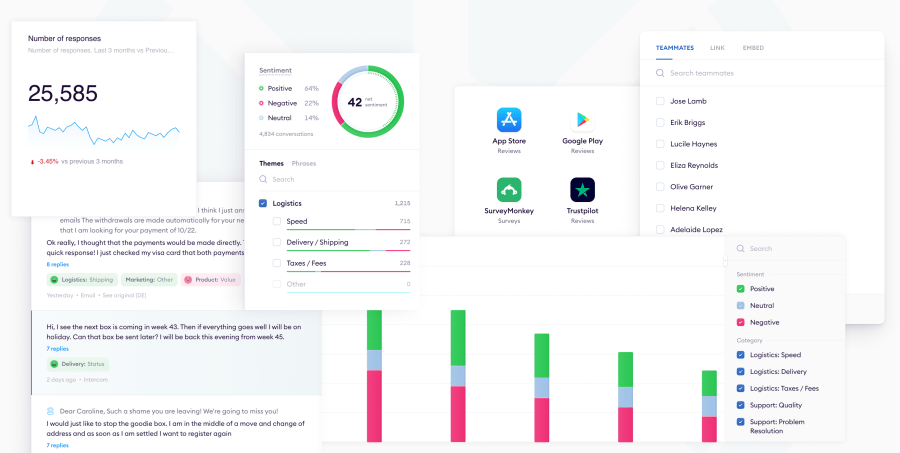
Chattermill is an AI-native Customer Intelligence and Voice of the Customer platform that analyzes sentiment across surveys, support conversations, reviews, social media, and voice calls. Its biggest strength is aspect-based sentiment analysis, which assigns sentiment to individual themes rather than reducing an entire comment to one positive or negative label.
That means a customer can be positive about one part of an experience and negative about another, giving teams a more useful view of what is actually driving customer sentiment.
Best for
Enterprise Customer Experience and insights teams analyzing large volumes of feedback across multiple channels.
What it does well
- Theme-level sentiment: Each theme in a piece of feedback can be classified as positive, neutral, or negative independently.
- Automated topic detection: AI identifies recurring topics in customer feedback and organizes them into a business-specific theme structure.
- Net Sentiment: Chattermill provides a Net Sentiment metric based on the balance of positive and negative theme mentions.
- Multi-channel feedback: Teams can analyze feedback from surveys, support conversations, online reviews, social media, and voice calls in one place.
- Impact analysis: Chattermill can show how individual themes affect metrics such as Net Promoter Score, helping teams prioritize the issues that matter most.
- Customer segmentation: Feedback can be filtered using metadata such as source, location, or other customer attributes to compare sentiment across different groups.
- Sentiment trends and anomaly alerts: Teams can monitor changes over time and receive alerts when metrics or feedback patterns move outside expected ranges.
Limitations and considerations
- Chattermill is primarily designed around customer feedback rather than public social listening or standalone market intelligence.
- Its depth is most useful for organizations processing substantial volumes of feedback across several sources.
- It is geared toward enterprise Customer Experience and insights teams rather than lightweight self-serve sentiment analysis.
Pricing
Chattermill uses custom, usage-based pricing based on data volume and feature access. It does not charge per user, so organizations can add additional users without increasing seat costs.
2. Brandwatch
Overview
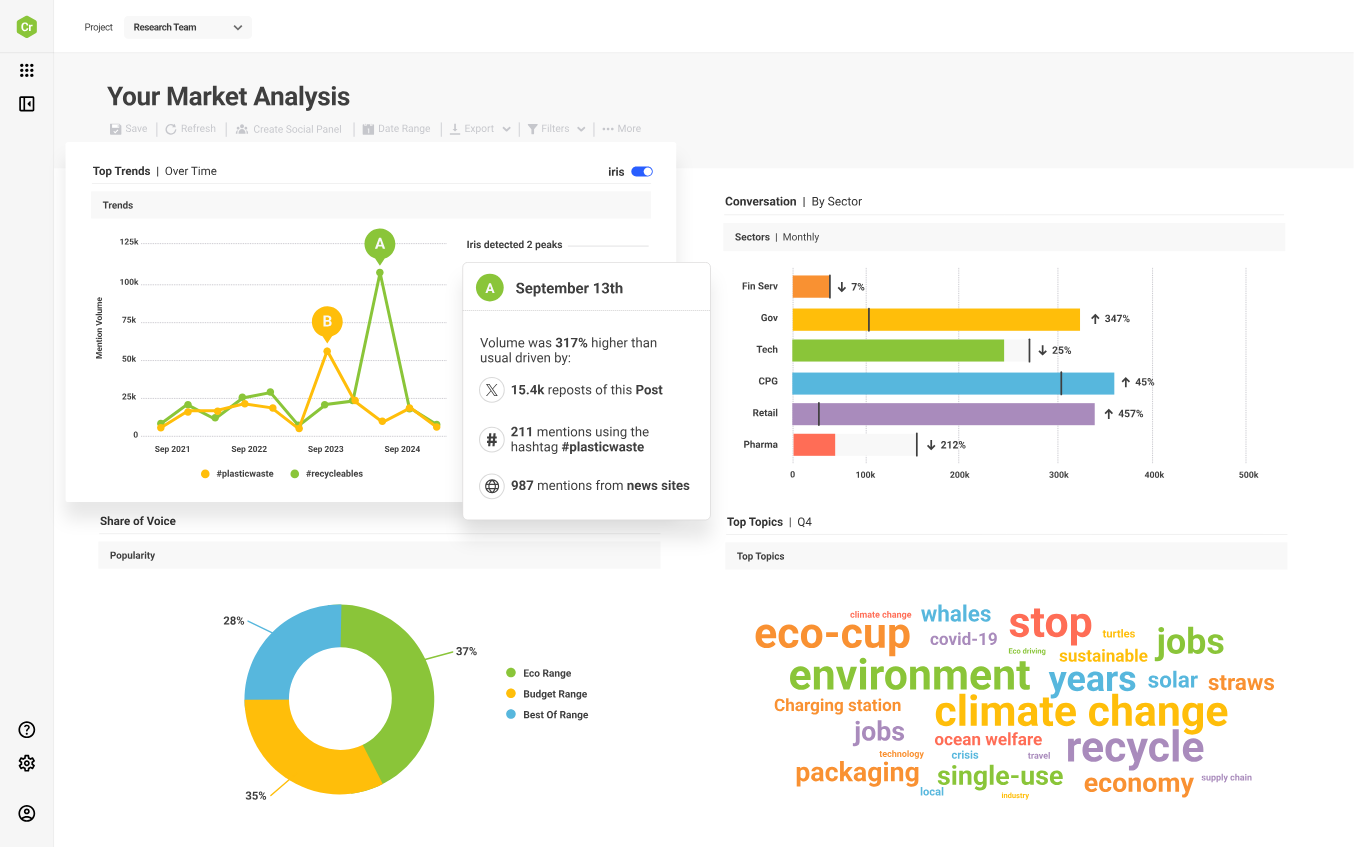
Brandwatch is a consumer intelligence and social listening platform that analyzes public conversations across social networks, websites, forums, news sources, and other online channels. It helps teams understand how people feel about brands, products, competitors, and emerging topics at scale.
Its Consumer Intelligence platform combines sentiment analysis with audience segmentation, trend detection, image analysis, AI-powered search, and automated reporting.
Best for
Brand, marketing, communications, and research teams monitoring sentiment across public consumer conversations.
What it does well
- Social listening: Brandwatch tracks large volumes of public conversations across major social networks and millions of online sources.
- Sentiment analysis: Brandwatch classifies and analyzes consumer opinion so teams can monitor changes in positive, negative, and neutral sentiment over time.
- Brand monitoring: Teams can track how people discuss their brand and identify shifts in reputation or customer perception.
- Trend detection: Its real-time and historical datasets help teams identify emerging topics and sentiment shifts before they become more widespread.
- Competitor intelligence: Brandwatch can compare conversations and sentiment around competing brands, products, or campaigns.
- Audience segmentation: Machine learning classifiers can segment conversations and audiences into more useful groups for analysis.
- Image analysis: AI can detect objects, scenes, actions, and logos inside images, extending sentiment and brand monitoring beyond text alone.
- Iris AI: Brandwatch's generative AI assistant turns large datasets into readable insights and helps teams investigate conversations more quickly.
- Automated alerts: Teams can set up AI-powered alerts and reports to surface important changes in consumer conversation.
Limitations and considerations
- Brandwatch is strongest at analyzing public consumer and market sentiment rather than private customer conversations.
- It is less suited to B2B use cases where sentiment needs to be connected to account health, renewals, or stakeholder relationships.
- The platform is geared toward enterprise research, marketing, and communications teams rather than lightweight sentiment analysis.
Pricing
Brandwatch does not publish fixed prices for its Consumer Intelligence platform. It offers standard through enterprise plans, with pricing provided through a custom quote based on the solution and scale required.
3. Velaris
Overview
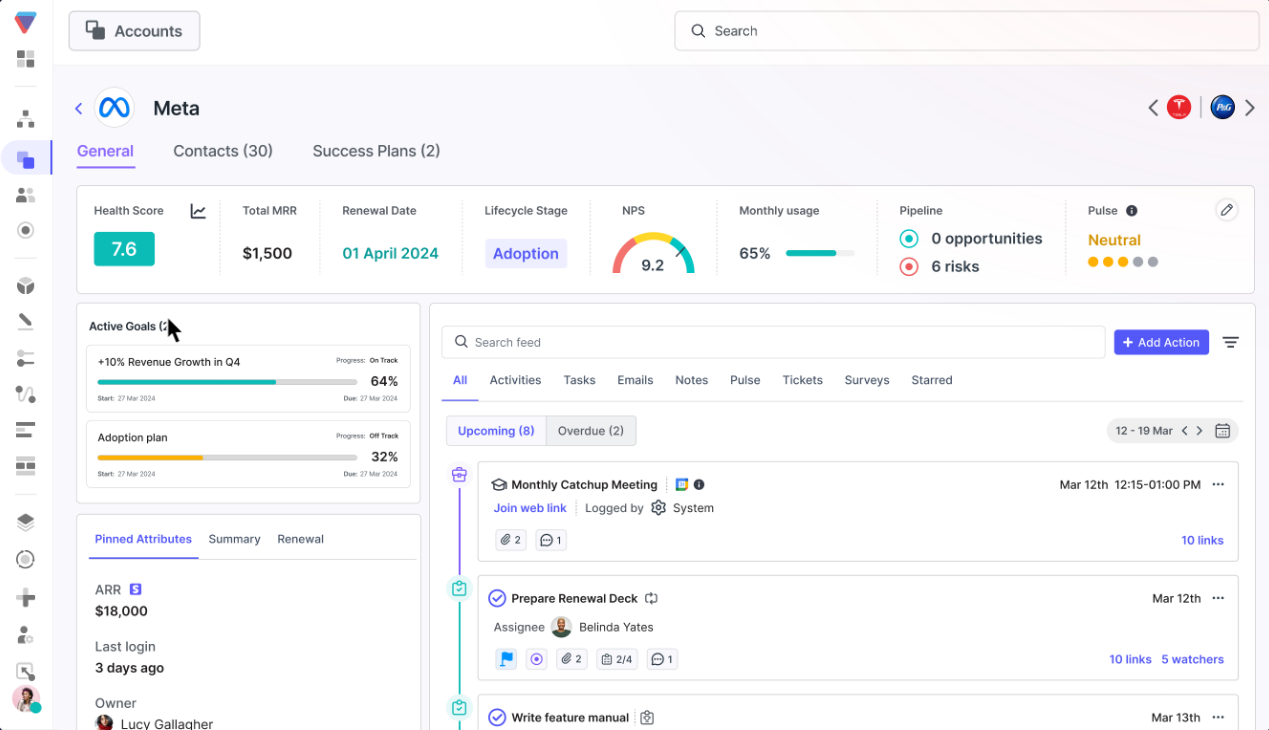
Velaris is an AI-native Customer Success Platform that uses sentiment analysis as part of a broader customer intelligence layer. It analyzes signals from calls, emails, support tickets, surveys, and other customer communications, then connects that sentiment with account health, usage, feedback, and commercial context.
A highly rated tool on G2, Velaris differentiates itself in that it does not treat sentiment as a standalone score. It becomes one signal in the wider account picture, helping Customer Success teams understand whether a shift in tone could indicate churn risk, dissatisfaction, or a potential growth opportunity.
Best for
Mid-market and enterprise B2B teams that want sentiment tied directly to customer health, retention, and expansion.
What it does well
- AI Pulse: Converts sentiment from customer calls and communications into an AI-generated health signal that can be incorporated into account health scores.
- CallSense: Analyzes call transcripts for tone, risks, opportunities, recurring themes, and action items.
- Trending Topics: Automatically groups customer conversations into recurring themes and tracks how sentiment changes around those topics over time.
- Topic-level sentiment: Teams can identify which specific issues, features, or discussion areas are driving positive or negative sentiment instead of relying on one overall score.
- Segment analysis: Sentiment reports can be filtered by feature, channel, customer segment, or other account attributes to identify where problems are concentrated.
- Health score integration: Sentiment can be combined with quantitative health metrics, giving teams a more complete view of account health.
- Risk and expansion signals: Velaris AI extracts signs of dissatisfaction, blockers, enthusiasm, and upsell potential from customer conversations.
- AI agents: Customer signals can feed proactive agents that monitor accounts and surface emerging risks or opportunities rather than waiting for Customer Success Managers to find them manually.
Limitations and considerations
- Velaris is designed primarily for B2B Customer Success and post-sales teams rather than broad consumer sentiment research.
- It is not intended to replace a public social-listening platform such as Brandwatch.
- It is a broader Customer Success Platform, so teams that only need a sentiment API or basic text classifier may find a standalone tool simpler.
Pricing
Velaris uses custom pricing based on each organization’s requirements. Its core license includes five users and unlimited viewers, with sentiment scoring, conversation analysis, health scores, surveys, reporting, automation, and other Customer Success capabilities included in the wider platform.
4. Thematic
Overview
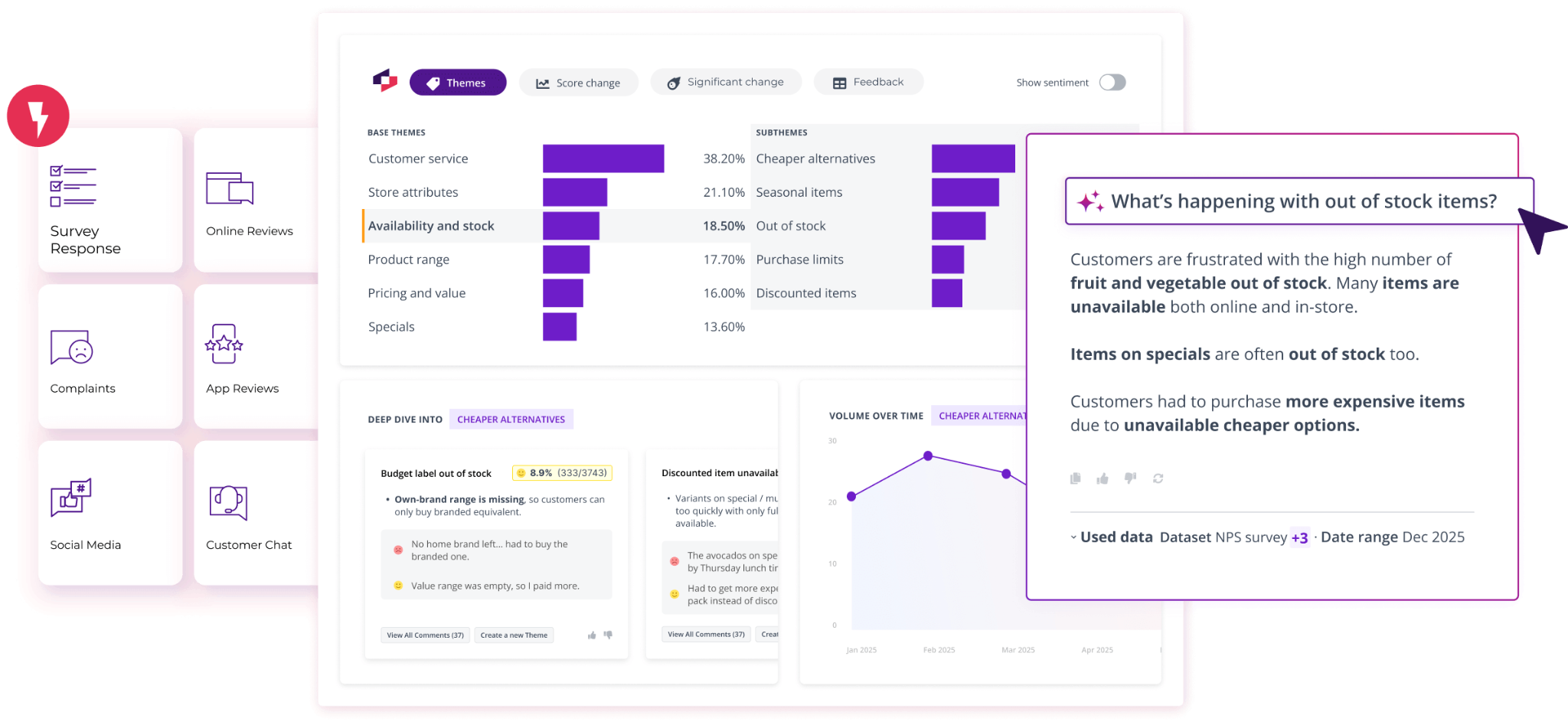
Thematic is an enterprise customer intelligence platform built for analyzing large volumes of unstructured feedback. It automatically turns surveys, support tickets, reviews, call transcripts, and social feedback into themes, sentiment, and business impact.
Its main strength is explainability. Teams can see which customer comments sit behind each theme, validate the AI's classifications, and understand which issues are actually driving changes in metrics such as CSAT or NPS.
Best for
Enterprise Customer Experience and research teams that need detailed, explainable sentiment analysis across large volumes of open-text feedback.
What it does well
- AI theme discovery: Thematic automatically identifies themes and sub-themes from customer feedback without requiring teams to pre-build a taxonomy.
- Theme-level sentiment: Sentiment is tied to specific aspects of the customer experience, helping teams see what customers like or dislike rather than relying on one overall score.
- Multi-source feedback: Surveys, support tickets, reviews, calls, chat logs, and social feedback can be analyzed together.
- Impact analysis: Themes can be connected to changes in metrics such as CSAT and NPS to show which issues are having the biggest effect.
- Revenue-at-risk analysis: Teams can investigate which customer issues are associated with commercial impact rather than prioritizing themes by mention volume alone.
- Natural-language analysis: Thematic Answers lets users ask questions about customer feedback without manually building every report.
- Explainable taxonomy: Analysts can review, edit, and validate AI-generated themes, with every insight traceable back to the underlying customer comments.
- Dashboards and reporting: Teams can share theme, sentiment, and impact analysis through dashboards and reports across the organization.
Limitations and considerations
- Thematic is primarily an analytics and intelligence layer rather than a platform for managing customer relationships or operational workflows.
- It is best suited to organizations with substantial amounts of qualitative feedback. Thematic says the platform works best with at least 2,000 rows of verbatim feedback.
- Its entry price is significantly higher than lightweight sentiment or survey tools.
Pricing
Thematic's Foundation plan starts at $25,000 per year and includes up to 25,000 comments and three datasets. The plan includes thematic and sentiment analysis, dashboards, workflows, natural-language querying, and integrations.
Enterprise pricing is custom and scales based on comment volume, datasets, analysis requirements, and support.
5. Enterpret
Overview
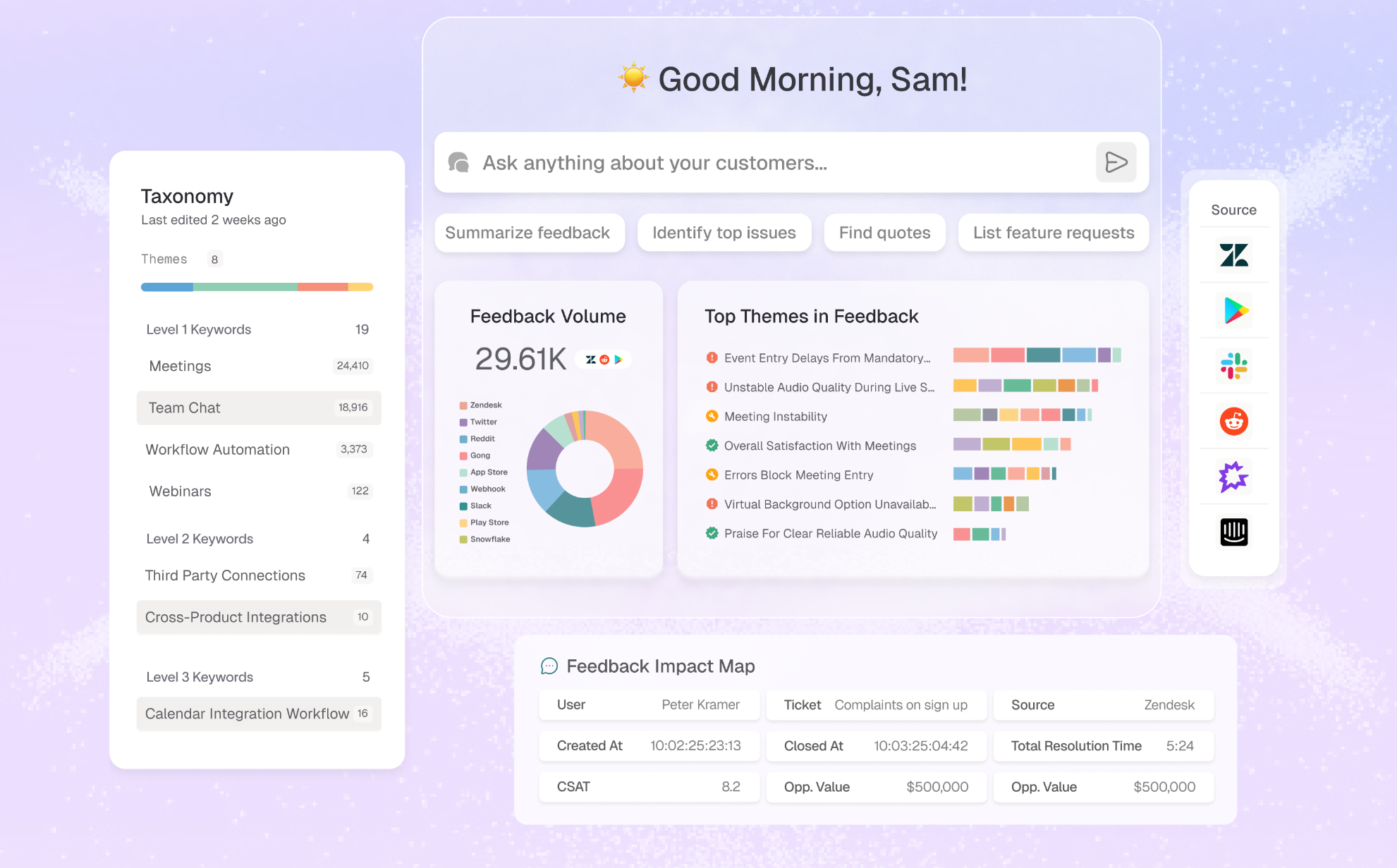
Enterpret is a customer feedback intelligence platform that analyzes sentiment across more than 50 feedback sources, including support tickets, reviews, calls, surveys, Slack, and app stores. Its Adaptive Taxonomy automatically organizes feedback into themes and sub-themes while preserving the customer and account context behind each signal.
That makes it especially useful for teams that want to understand how sentiment differs by customer segment, account, product area, or revenue rather than analyzing each feedback source separately.
Best for
Product, Customer Experience, and research teams dealing with large volumes of unstructured feedback across many channels.
What it does well
- Multi-channel feedback: Enterpret connects feedback from more than 50 sources and brings it into one analysis layer.
- Aspect-level sentiment: Sentiment is tied to specific themes and topics, helping teams see what customers feel positively or negatively about rather than relying on one overall score.
- Adaptive Taxonomy: AI automatically creates and maintains a multi-level theme hierarchy based on the language customers actually use.
- Customer context: Feedback can be connected to users, accounts, opportunities, product areas, revenue, lifecycle stage, and other business attributes.
- Wisdom AI: Teams can ask natural-language questions about feedback and receive answers grounded in the underlying customer data.
- AI agents: Enterpret can monitor feedback proactively and surface emerging issues without requiring teams to run every analysis manually.
- Explainable insights: Classifications and AI-generated findings can be traced back to the source feedback, making it easier to validate conclusions.
- Workflow integrations: Insights can be routed back into product, engineering, and Customer Experience workflows so teams can act on emerging themes.
Limitations and considerations
- Enterpret is primarily a feedback intelligence platform rather than a full Customer Success or customer operations system.
- Its value is strongest for organizations with enough feedback volume and source diversity to benefit from automated taxonomy and cross-channel analysis.
- Pricing is not publicly listed, so teams need to request a quote.
Pricing
Enterpret uses custom pricing based on the organization’s data volume, integrations, and requirements. It does not currently publish standard self-serve plan prices.
6. Qualtrics Text iQ
Overview
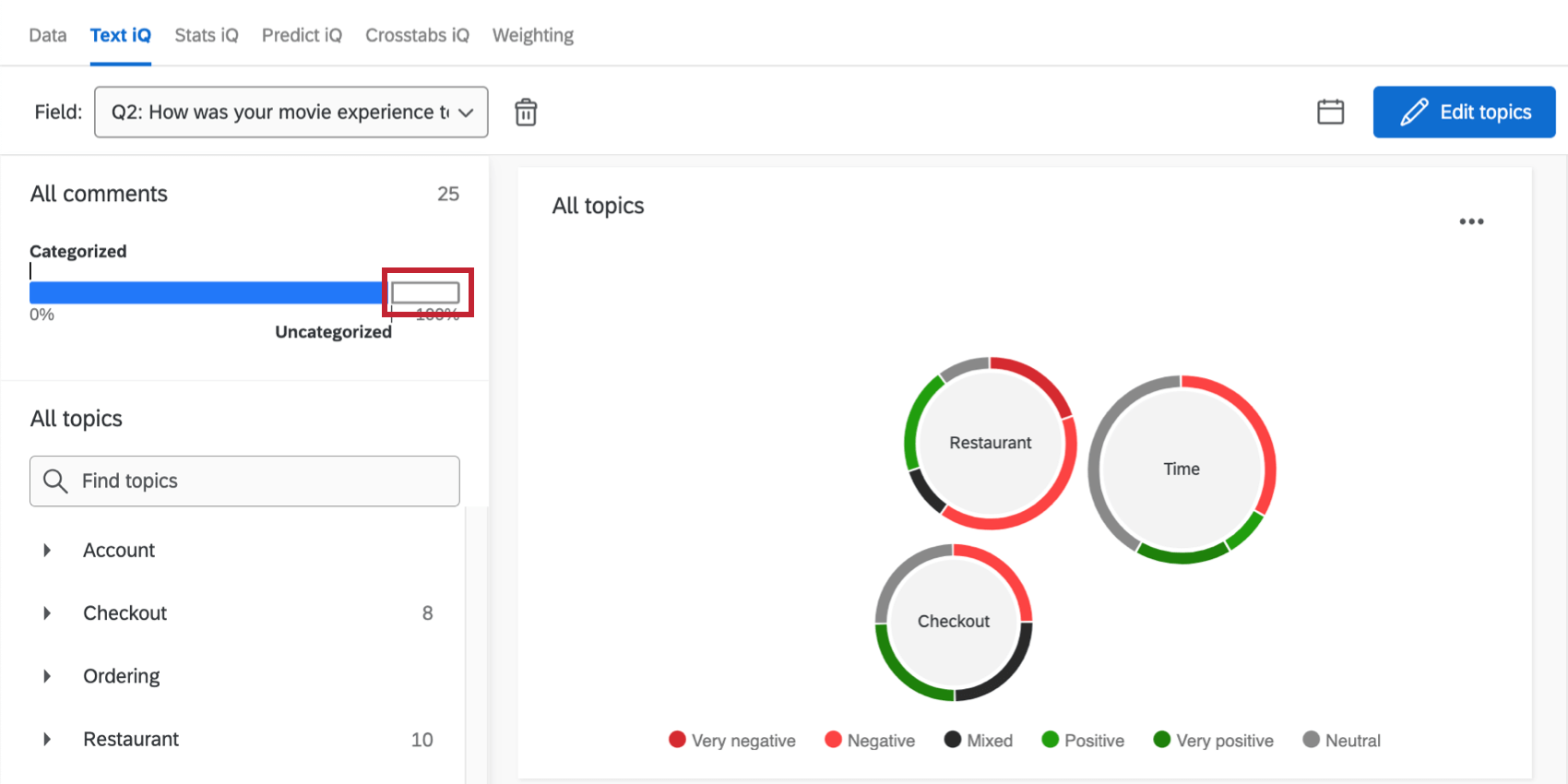
Qualtrics Text iQ is the text analytics layer within Qualtrics that analyzes open-text feedback for topics and sentiment. It assigns responses labels ranging from Very Negative to Very Positive, as well as Mixed, and gives each response a numeric sentiment score.
Its biggest advantage is that it can separate overall sentiment from topic sentiment. A single response can therefore be positive about service but negative about pricing, preserving the nuance that would be lost in one overall score.
Best for
Large enterprises already using Qualtrics for surveys, Voice of the Customer, and Customer Experience programs.
What it does well
- Overall sentiment: Text iQ assigns an overall sentiment label and score to each open-text response.
- Topic sentiment: Individual topics within the same response can receive separate sentiment labels and scores.
- Sentiment intensity: Scores range from -2 to +2, helping teams distinguish mildly negative feedback from more strongly expressed dissatisfaction.
- Automated topics: Qualtrics can recommend recurring topics in customer feedback and organize responses around those themes.
- Survey analysis: Text iQ sits directly inside Qualtrics survey and Customer Experience workflows, making it easy to analyze qualitative responses alongside structured survey data.
- Multi-language analysis: Text iQ supports text analysis across a range of languages, including English, Spanish, German, French, Portuguese, Japanese, Korean, and Simplified Chinese.
- Dashboards and reporting: Teams can visualize topic and sentiment data in reports and Customer Experience dashboards.
- Sentiment-based workflows: Sentiment and topic signals can be used in survey flows to branch experiences or trigger different actions based on what a customer says.
Limitations and considerations
- Sentiment analysis is only available to customers with Advanced Text capabilities.
- Qualtrics is a broad enterprise Experience Management platform, so it can be more complex than a dedicated sentiment analysis tool.
- It is most compelling for organizations already using Qualtrics for surveys and Customer Experience rather than teams looking for a lightweight standalone sentiment product.
Pricing
Qualtrics does not publish standalone pricing for Text iQ or Advanced Text. Access depends on the organization's Qualtrics package and licensing, so teams need to contact Qualtrics for a custom quote.
7. SentiSum
Overview
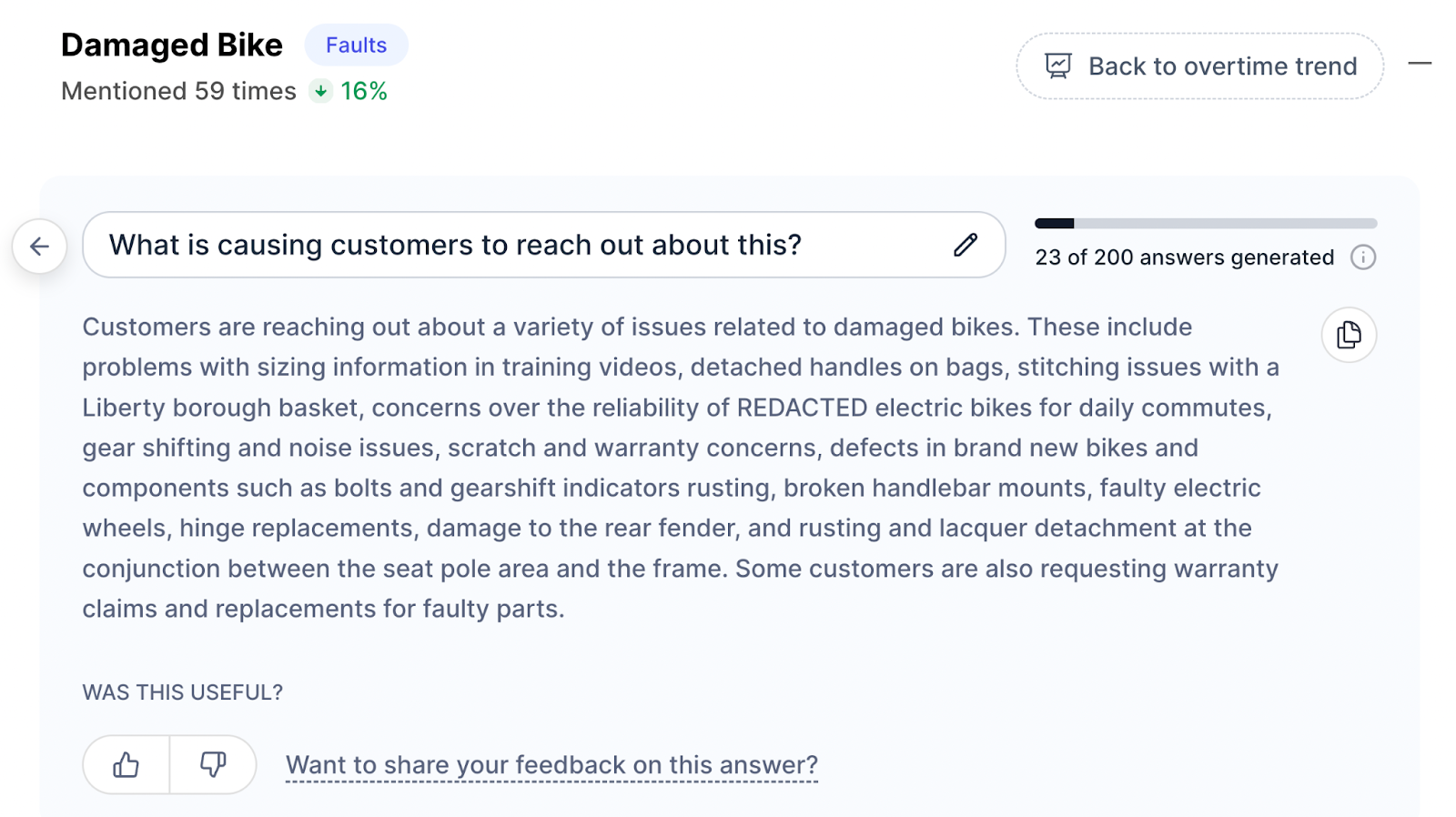
SentiSum is an AI-powered Customer Experience intelligence platform that analyzes support conversations, calls, chats, emails, surveys, and reviews to uncover recurring topics and the drivers behind customer sentiment. Its strongest use case is helping service teams understand why customers are getting in touch and which issues are creating friction.
Rather than relying on agents to manually tag conversations, SentiSum automatically categorizes customer issues at scale and tracks how those reasons for contact change over time.
Best for
Enterprise customer support and service teams that want to connect customer sentiment with reasons for contact and recurring service issues.
What it does well
- Reasons for contact: AI automatically categorizes conversations into granular topics so teams can see why customers are contacting support.
- Sentiment drivers: SentiSum helps identify which customer issues are associated with positive or negative sentiment and friction.
- Multi-channel analysis: Teams can bring together calls, chats, emails, surveys, reviews, and other customer conversations.
- CSAT and NPS analysis: Survey feedback can be analyzed by topic and sentiment, while support ticket context can help explain what drove individual scores.
- Real-time tagging: Machine-learning models classify incoming conversations automatically, reducing reliance on manual agent tagging.
- Daily Digests: Teams can receive summaries of emerging topics and changes in customer conversations directly by email.
- Natural-language analysis: Users can ask questions about their customer data and receive AI-generated answers based on underlying conversations.
- Automated routing and prioritization: AI-generated tags can be used to prioritize and route customer issues to the appropriate teams.
- Multilingual analysis: SentiSum supports analysis across hundreds of languages, making it suitable for international support operations.
Limitations and considerations
- SentiSum is strongly oriented toward customer support and service operations, making it less suitable for brand monitoring or broader market research.
- Its current offering is aimed at enterprises processing substantial volumes of customer conversations rather than smaller teams looking for lightweight sentiment analysis.
- The platform covers a wider CX intelligence use case, so it may be more than teams need if they only want a basic sentiment classifier.
Pricing
SentiSum's current CX Intelligence Layer starts at $100,000 per year on an annual, volume-banded partnership. This includes analysis across customer conversation channels, a custom taxonomy, unlimited users, integrations, and its Insights and Early Warning agents. Additional AI agents are priced separately.
8. unitQ
Overview
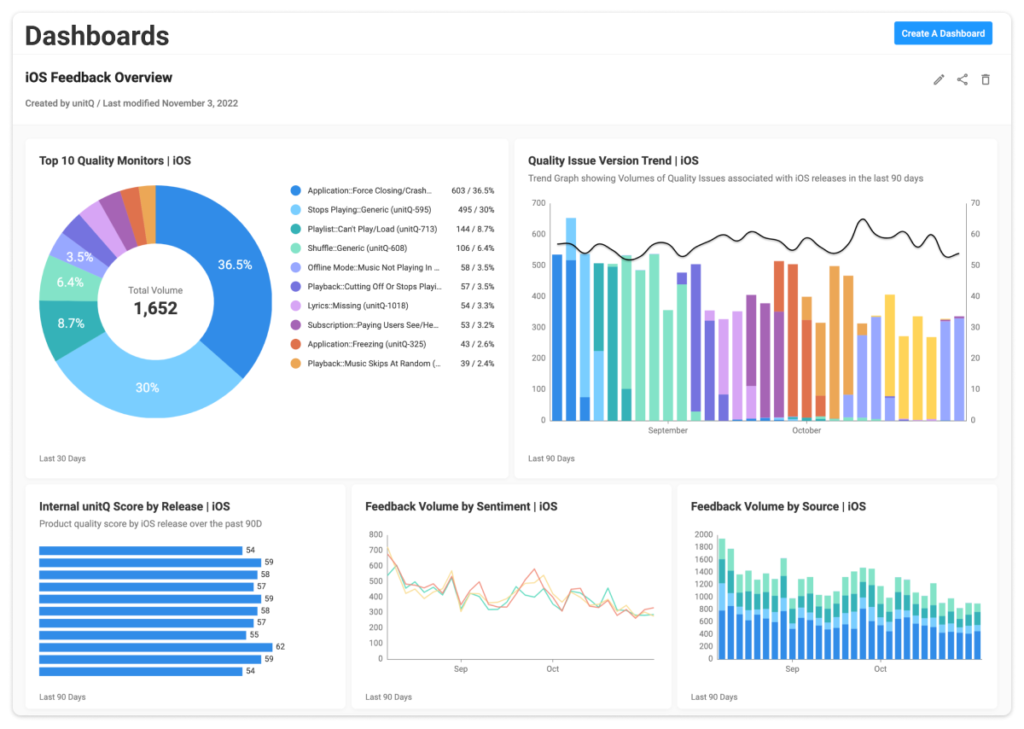
unitQ is an AI-powered customer intelligence platform that analyzes feedback from app reviews, support tickets, surveys, social media, community forums, and other sources in real time. Its unitQ Monitor product classifies that feedback using a custom AI taxonomy so teams can connect changes in sentiment with specific product issues, features, platforms, or releases.
This makes it particularly useful for product and engineering teams that want to move beyond an overall sentiment score and understand what is causing a change, how quickly it is spreading, and which teams need to respond.
Best for
Product, engineering, and support teams that need real-time visibility into customer sentiment and product quality issues.
What it does well
- Real-time sentiment monitoring: unitQ continuously analyzes incoming customer feedback so teams can spot changes in sentiment and emerging issues quickly.
- Multi-channel feedback: Feedback from app reviews, support conversations, surveys, social media, community forums, and other sources can be analyzed together.
- AI taxonomy: Feedback is automatically classified using a multi-level taxonomy that adapts as new issues and categories emerge.
- Issue detection: Teams can identify the specific bugs, product areas, or customer problems driving negative sentiment instead of relying on an aggregate score.
- Release monitoring: Sentiment and feedback can be tracked around product changes to identify whether a new release has introduced customer friction.
- Real-time alerts: Anomalies and spikes can trigger notifications through tools such as Slack, Microsoft Teams, and PagerDuty.
- Root-cause analysis: unitQ helps teams investigate the feedback behind an emerging problem and connect it to specific customer experiences.
- Competitive benchmarking: Public feedback can be analyzed to compare product quality and sentiment with competing products.
- agentQ: Teams can use unitQ's AI assistant to investigate customer feedback and access unitQ intelligence through AI tools such as ChatGPT and Claude.
Limitations and considerations
- unitQ is strongly oriented toward product quality, product feedback, and consumer-scale applications.
- It is less focused on complex B2B account relationships where sentiment needs to be connected to individual stakeholders, renewals, or Customer Success workflows.
- Its Monitor platform is broader than teams need if they only want to analyze a small batch of comments or survey responses.
Pricing
Pricing for unitQ Monitor is custom and is not publicly listed.
unitQ separately offers its Research product with published pricing: Pro costs $99 per month, Team costs $449 per month, and Enterprise uses custom pricing. These prices apply to unitQ Research rather than the Monitor platform described above.
9. Dialpad
Overview
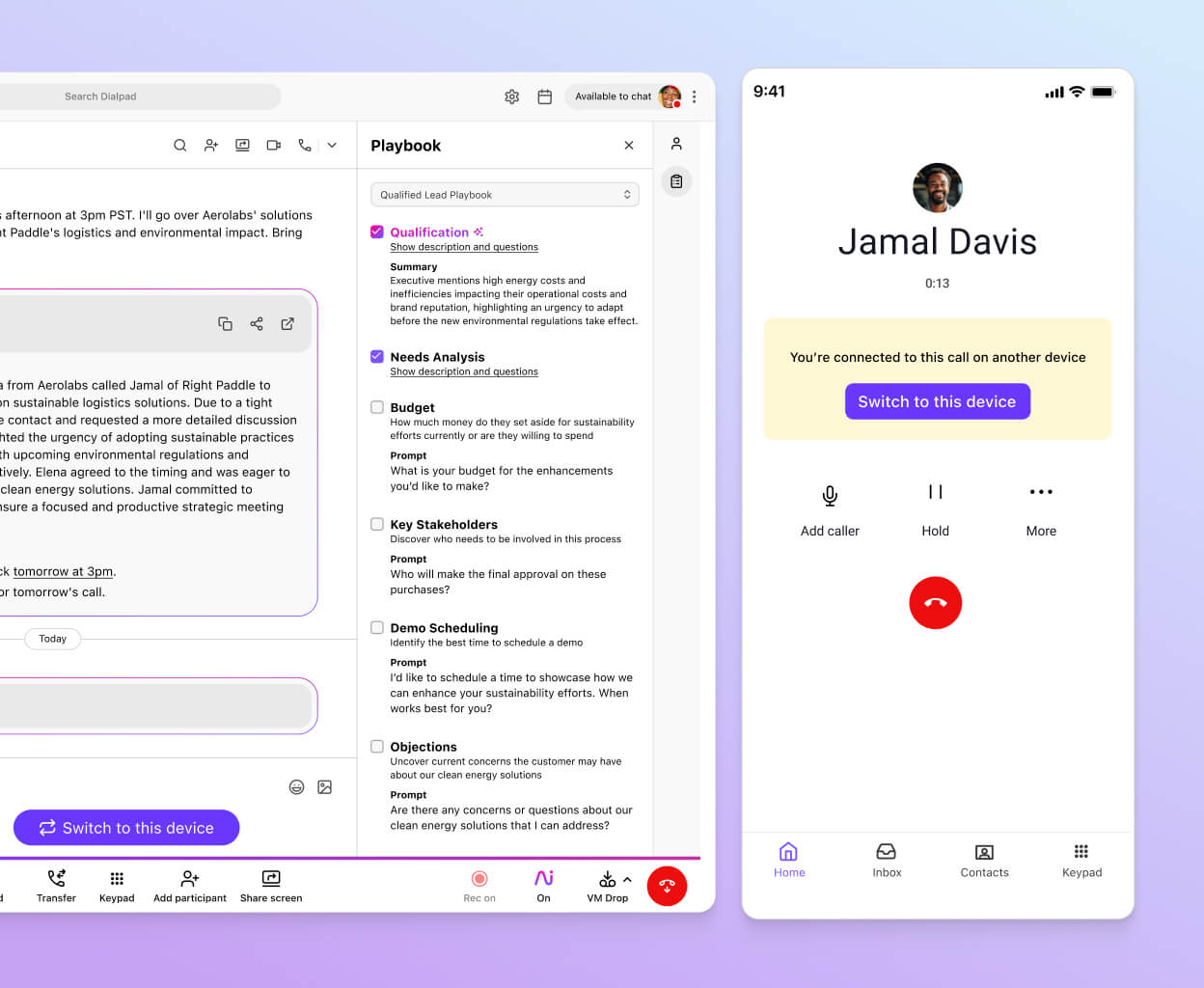
Dialpad is an AI-powered communications platform that analyzes customer sentiment during live voice conversations. Its real-time sentiment tools let supervisors see how calls are progressing while they are still happening, alongside live transcripts and other conversation intelligence.
That makes it particularly useful for contact centers where teams need to identify difficult conversations quickly and intervene before the call ends.
Best for
Contact centers and support teams that need real-time sentiment analysis across customer calls.
What it does well
- Live call sentiment: Dialpad analyzes conversations in real time and shows supervisors whether customer sentiment is moving in a positive or negative direction.
- Real-time transcription: Calls are transcribed as they happen, giving supervisors additional context behind changes in sentiment.
- Supervisor dashboards: Managers can use live dashboards to identify calls that may need immediate attention.
- Call intervention: Supervisors can listen in, coach agents, or take over a call when sentiment indicates a conversation may be going badly.
- AI CSAT: Dialpad can automatically estimate Customer Satisfaction Scores from contact-center calls rather than relying only on customers who complete post-call surveys.
- CSAT explanations: AI can identify the conversational factors that contributed to a predicted CSAT score, helping teams understand why a customer was satisfied or frustrated.
- Agent coaching: Sentiment, transcripts, AI CSAT, and other conversation signals can help managers identify coaching opportunities for individual agents.
- Conversation intelligence: Dialpad AI also captures keywords, action items, summaries, and other signals alongside sentiment.
Limitations and considerations
- Dialpad's sentiment capabilities are primarily designed around conversations taking place through its communications and contact-center platform.
- It is less suited to teams whose main sentiment sources are surveys, product reviews, social media, or other written feedback.
- Feature availability varies by product and plan. Live sentiment is included across Dialpad Support plans, while AI CSAT is an add-on on some tiers and included with Premium.
Pricing
Dialpad's current pricing depends on the product and plan selected. Live call sentiment is included with Dialpad Support, while AI CSAT is available as a paid add-on on Essentials and Advanced and included with Premium. Dialpad directs customers to its sales team for current plan pricing.
10. Google Cloud Natural Language
Overview
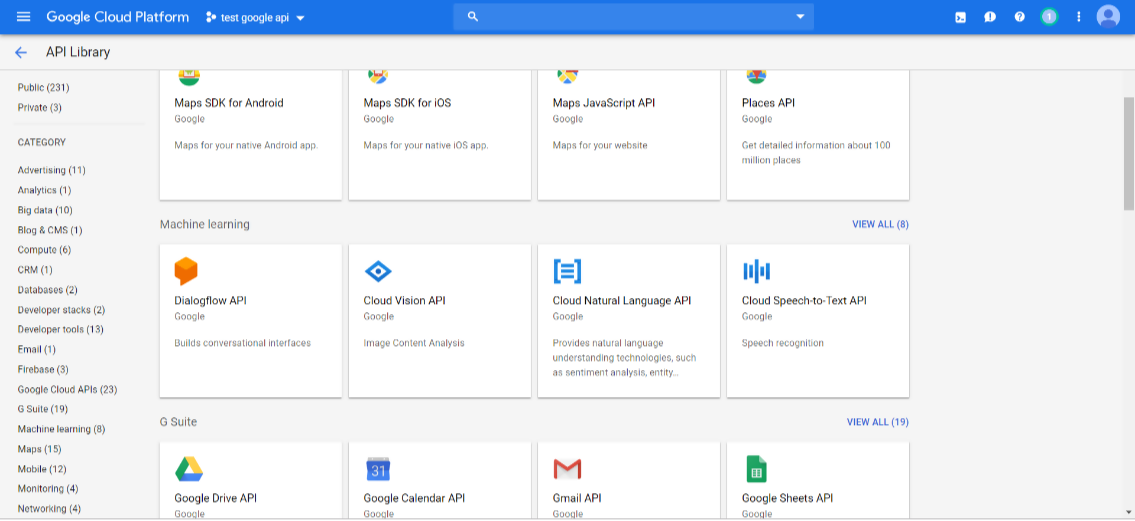
Google Cloud Natural Language provides sentiment analysis through an API rather than a finished Customer Experience platform. Developers can submit text and receive sentiment scores that can be incorporated into their own applications, dashboards, workflows, or AI systems.
It also supports entity sentiment analysis, which identifies individual entities mentioned in a piece of text and measures the sentiment expressed toward each one. That makes it possible to distinguish how someone feels about a particular product, company, feature, or other entity rather than relying only on the overall tone of the document.
Best for
Engineering and data teams that want sentiment analysis infrastructure they can embed into custom applications.
What it does well
- Sentiment analysis API: Developers can send unstructured text to the API and receive an overall sentiment score and magnitude.
- Entity sentiment: The API can identify entities within text and calculate separate sentiment scores for each one.
- Entity extraction: Google Cloud Natural Language can identify people, organizations, locations, products, events, and other entities within text.
- Content classification: Text can be automatically categorized into relevant content categories alongside sentiment analysis.
- Language detection: The API can automatically detect the language of submitted text when one is not specified.
- Multilingual sentiment: Standard sentiment analysis supports languages including English, Spanish, French, German, Japanese, Korean, Portuguese, Arabic, Dutch, Turkish, and Vietnamese. Entity sentiment currently supports a smaller set of languages.
- Scalable processing: Google Cloud supports high-volume API usage, making it suitable for teams processing sentiment across large datasets or applications.
- Flexible integration: Because it is an API, teams can decide how sentiment scores feed into their own dashboards, alerts, routing rules, or customer workflows.
Limitations and considerations
- Google Cloud Natural Language requires engineering resources to implement and maintain.
- It does not provide an out-of-the-box Customer Experience, Customer Success, or feedback management workflow.
- Teams need to build their own dashboards, customer context, alerts, and actions around the sentiment results.
- Entity sentiment analysis has narrower language support than standard sentiment analysis.
Pricing
Google Cloud Natural Language uses usage-based pricing measured in 1,000-character units.
For standard Sentiment Analysis, the first 5,000 units per month are free. Usage from 5,000 to 1 million units costs $1 per 1,000 units, with lower per-unit pricing at higher volumes.
Entity Sentiment Analysis is priced separately and costs $2 per 1,000 units between 5,000 and 1 million units, with the first 5,000 units also free.
Conclusion
The right AI sentiment analysis tool depends on where your customer conversations happen and what you want to do with the insight.
For B2B post-sales teams, Velaris, a highly rated software on G2, takes a different approach by connecting sentiment to the wider account context. A negative email, call, or recurring topic can sit alongside customer health, usage, support activity, and commercial data, helping Customer Success teams understand whether a change in sentiment represents a broader risk and whether action is needed.
If you want to see how Velaris connects sentiment analysis with customer health, risk, and AI agents, book a demo to see Velaris in action.
Frequently Asked Questions
What is an AI sentiment analysis tool?
An AI sentiment analysis tool uses artificial intelligence and natural language processing to identify attitudes, opinions, and emotions expressed in customer language.
These tools can analyze written or spoken interactions and typically classify sentiment as positive, negative, neutral, or somewhere along a more detailed scale.
How does AI sentiment analysis work?
AI sentiment analysis tools process customer language and classify the sentiment expressed within it. Basic systems assign an overall sentiment label or score, while more advanced tools also identify topics, themes, and the sentiment associated with each one.
Modern platforms can also track how sentiment changes over time and compare it across customers, segments, products, or channels.
What is aspect-based sentiment analysis?
Aspect-based sentiment analysis measures sentiment toward specific topics within the same piece of feedback.
For example, a customer might say they love the product but think the pricing is too high. Rather than labeling the whole comment as positive or negative, aspect-based analysis can record positive sentiment toward the product and negative sentiment toward pricing separately.
How accurate is AI sentiment analysis?
Accuracy varies significantly depending on the tool, language, type of customer data, and complexity of the conversation.
Sarcasm, mixed sentiment, industry terminology, ambiguous language, and missing context can all make sentiment harder to classify correctly.
For that reason, businesses should test a platform against their own customer conversations rather than relying only on a vendor's general accuracy claims.
What should you look for in an AI sentiment analysis tool?
Start with the customer conversations you actually want to analyze. The tool should support those sources and integrate with the systems where the data already lives.
Other important capabilities include topic-level sentiment, multilingual analysis, customer segmentation, trend detection, alerts, and the ability to connect sentiment with wider customer context. The strongest tools also make it easy to turn a sentiment change into an investigation or action rather than leaving it as another dashboard metric.

The Velaris Team
A (our) team with years of experience in Customer Success have come together to redefine CS with Velaris. One platform, limitless Success.





Velaris is an AI-native Customer Success Platform built for mid-market and enterprise B2B SaaS teams. From customer health scoring and churn prediction to onboarding automation, renewals, and expansion workflows, Velaris helps recurring revenue teams understand account health, reduce churn, and scale customer success with greater visibility and control.