We look forward to showing you Velaris, but first we'd like to know a little bit about you.


Automating Onboarding: Best Practices
Start automating your onboarding process to streamline your workflows and maintain a positive customer experience.
The Velaris Team
August 7, 2026
Onboarding often feels slow, inconsistent, and frustrating when handled manually. Scattered documents, delayed approvals, and unclear communication can drain time and weaken customer trust.
Automation solves these pain points by streamlining tasks, reducing errors, and creating smoother experiences from the start. In this article, you’ll learn why automating onboarding matters, the key components of a strong process, steps to implement it, best practices, common mistakes to avoid, tools that support automation, and how to measure success.
Key takeaways
- Automating onboarding reduces friction, speeds up customer success, and builds trust from the very first interaction.
- Clear components like welcome emails, guided tours, checklists, and reminders ensure customers stay on track and engaged.
- Implementation works best when customer journeys are mapped, milestones defined, and workflows tested before scaling.
- Best practices include keeping onboarding simple, personalizing journeys, balancing automation with human touch, and refining with feedback.
- Measuring success through milestones, adoption rates, and customer satisfaction ensures onboarding continues to drive long‑term retention.
Why automating customer onboarding matters
Automating customer onboarding means using technology to guide new customers through setup and product adoption without relying on slow, manual steps. It helps businesses deliver faster, smoother, and more consistent experiences that keep customers engaged from the very beginning. Instead of relying on slow, manual steps, automation ensures customers quickly see value, understand the product, and stay connected.
Reduces time‑to‑value for customers
Automation speeds up the journey from sign‑up to first success. Customers don’t have to wait for manual approvals or instructions; they get guided steps instantly, which helps them reach value faster.
Improves product adoption and engagement
Automated onboarding provides clear tutorials, reminders, and in‑app guidance. This makes it easier for customers to explore features, stay active, and build habits around using the product.
Ensures consistent experiences across customer segments
With automation, every customer receives the same quality of onboarding, no matter their size or location. This consistency builds trust and reduces confusion.
Minimizes churn by guiding customers effectively
According to the Wyzowl Customer Onboarding Survey (2025), 90% of users churn without strong onboarding, proving that a poor first experience can directly lead to customer loss. When customers feel supported and know how to use the product, they’re less likely to drop off. Automated checklists, prompts, and follow‑ups keep them on track, lowering the risk of churn.
Key components of an automated customer onboarding process
Strong customer onboarding relies on a few core components that make the journey smooth, consistent, and scalable. These elements ensure customers get the right guidance at the right time, while businesses save effort and reduce churn.
Welcome emails and guided product tours
Welcome emails are one of the most effective onboarding tools. Research shows welcome emails generate 4x more opens and 5x more clicks than standard campaigns, with average open rates around 50%. Pairing this with guided product tours ensures customers immediately understand how to use the product. Together, they set the tone for engagement and reduce early drop‑off.
Knowledge base and self‑service resources
Customers increasingly prefer solving issues themselves. A well‑organized knowledge base empowers customers to find answers quickly, reducing frustration and support costs.
Automated task checklists for customers
Onboarding checklists help customers activate key features and reach value faster. They provide a clear path for new users, ensuring important steps aren’t missed during setup or adoption.
Velaris, which is highly rated on G2, makes this process seamless by offering automated, customizable checklists that guide customers through their journey step by step. Success teams can design roles‑specific tasks, trigger reminders at the right time, and monitor progress in real‑time. This ensures customers stay on track, reach their first value quickly, and build confidence in using the product all without requiring constant manual follow‑ups.
In‑app notifications and reminders
Timely in‑app notifications guide customers at the exact moment they need help. Smart reminders prevent customers from stalling during onboarding and encourage continued engagement.
Integration with CRM and customer success platforms
CRM integration ensures onboarding data flows seamlessly into customer success workflows. Modern CRM systems are central to customer experience, with adoption linked to higher retention and productivity improvements across teams. By connecting onboarding automation with CRM, businesses can personalize journeys, track health scores, and align success managers with customer needs.
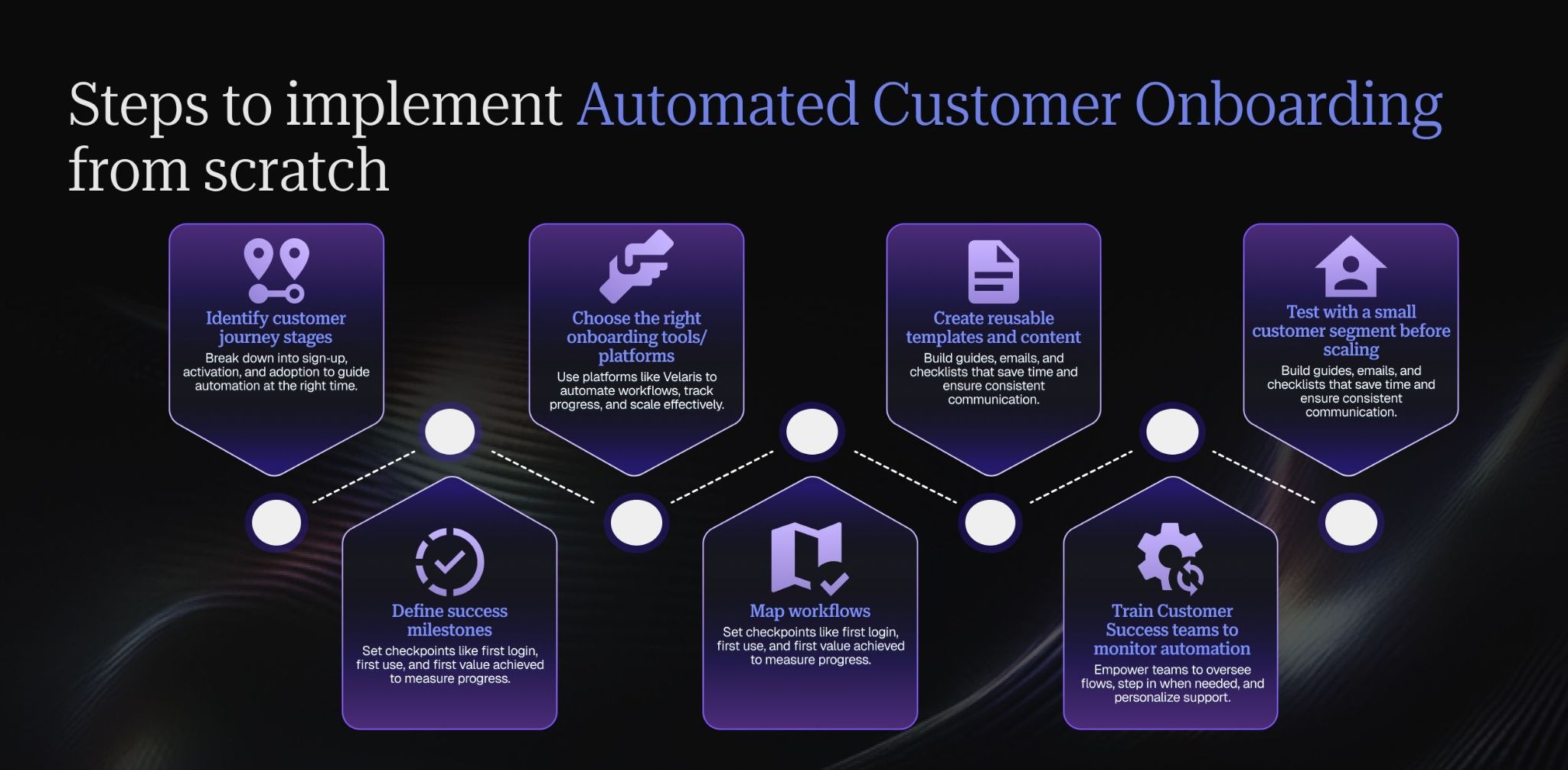
Steps to implement automated customer onboarding from scratch
Building automated customer onboarding from the ground up requires careful planning. Each step ensures customers move smoothly from sign‑up to adoption while success teams maintain control and visibility.
Identify customer journey stages
Start by mapping the customer journey into clear stages. For example, sign‑up is when they first register, activation is when they begin using the product, and adoption is when they integrate it into their routine. Knowing these stages helps you design automation that supports customers at the right time.
Define success milestones
Milestones are the checkpoints that show customers are progressing. A first login confirms they’ve accessed the product, a first use shows they’ve tried a feature, and first value achieved means they’ve seen a tangible benefit. Defining these milestones makes it easier to measure success and trigger automated guidance.
Choose the right onboarding tools/platforms
Select tools that fit your business needs. For example, Velaris allows you to orchestrate onboarding journeys, automate workflows, and track customer progress in one place. The right platform ensures automation is scalable and integrates with your existing systems.
Map workflows
Design workflows that guide customers step by step. This could include welcome emails to set expectations, in‑app prompts to highlight features, and automated success check‑ins to ensure customers don’t stall. Mapping these flows ensures customers always know what to do next.
Create reusable templates and content
Develop templates for emails, guides, and checklists that can be reused across different customer segments. This saves time, keeps messaging consistent, and ensures every customer receives clear instructions without reinventing the process each time.
Train customer success teams to monitor automation
Automation should enhance, not replace human support. Train your customer success teams to oversee automated flows, step in when customers need personal help, and adjust journeys based on feedback. This balance keeps onboarding efficient but still human‑centered.
Test with a small customer segment before scaling
Run a pilot program with a small group of customers. This allows you to spot gaps, friction points, or confusing steps before rolling out automation to everyone. Testing ensures the process is polished and effective when scaled.
Best practices for successful automated customer onboarding
Automated onboarding is most effective when it’s designed to be simple, personalized, and continuously improved. Following best practices ensures customers feel supported, reach value quickly, and stay engaged with your product.
Keep onboarding simple and intuitive
Avoid overwhelming customers with too many steps or complex instructions. A clear, easy‑to‑follow process helps them focus on what matters most, getting started and seeing value quickly.
Personalize journeys based on customer segment or use case
Different customers have different needs. Tailor onboarding flows to match their role, industry, or use case so they see relevant features and guidance. Personalization makes the experience feel more valuable and customer‑centric.
Keep some onboarding steps as human
Some onboarding steps should always involve a person because they shape trust early in the relationship.
The kickoff call is the first important human-led moment. This is where the CSM or onboarding lead confirms goals, introduces the process, aligns stakeholders, and sets expectations for what success looks like. Automated welcome emails and intake forms can prepare the customer, but the first live touchpoint should feel personal.
Human support is also needed at the first sign of confusion or friction. If a customer misses several onboarding steps, asks repeated support questions, stalls during setup, or shows signs of frustration, automation should trigger a CSM intervention rather than sending more reminders.
Contract, pricing, and scope-change conversations should stay human-led too. These discussions often involve nuance, expectations, and commercial sensitivity that automated workflows cannot handle well.
The same applies to disengagement or usage drop-off during onboarding. If a customer stops logging in, misses training, or fails to adopt a key feature, a CSM should investigate before the account becomes an early churn risk.
Provide proactive support options
Customers should never feel stuck. Offering proactive support like chatbots, FAQs, and tutorials ensures they can find answers instantly. This reduces frustration and builds confidence in using the product.
Swapping workflows mid-flight when a segment changes
An account may move from SMB to mid-market, from low-touch to high-touch, or from standard onboarding to strategic onboarding after new information appears.
When the segment changes, the workflow should adapt without forcing the team to restart onboarding from scratch. Keep completed milestones, notes, documents, and decisions in place, then switch the remaining steps to the new workflow.
For example, a low-touch customer that becomes high-value may keep its completed setup tasks, but gain a CSM-led success plan, executive check-in, custom training session, or additional implementation review.
The key is mapping which steps carry over and which steps change. Basic tasks such as account setup, integrations, and training completion may stay the same. Relationship-driven steps, stakeholder alignment, success criteria, and project governance may need to be added or upgraded.
Automation should also notify the right internal owners when a workflow changes mid-flight. CS, implementation, sales, support, and account management may need to know that the customer now requires a different level of service. Without that handoff, the customer can end up stuck between two onboarding models.
Use data to trigger relevant onboarding steps
Leverage customer behavior data to guide the journey. For example, if a customer hasn’t completed a key step, automation can send reminders or prompts. Data‑driven triggers keep onboarding timely and relevant.
Structuring automation for multi-workspace accounts
Onboarding automation becomes more complex when a customer has multiple workspaces, business units, regions, or products under the same parent account. If each child account is treated as a separate customer, the same organisation may receive duplicate kickoff emails, conflicting setup instructions, or overlapping task sequences.
Start by defining the account hierarchy before automation goes live. The parent account should usually hold the overall relationship context, commercial details, executive stakeholders, and success goals.
Child accounts or workspaces should hold the operational details, such as product setup, workspace-specific adoption, local users, training progress, and support activity.
Automation should then be split by level. Parent-level workflows can manage strategic steps like executive alignment, success plan approval, renewal readiness, and value reviews. Child-level workflows can manage workspace setup, user invites, product training, configuration tasks, and local adoption milestones.
Balance automation with human touch
Automation is powerful, but human interaction is still essential. Customer success managers (CSMs) should check in at critical points to build relationships, answer complex questions, and provide reassurance.
Continuously refine based on customer feedback
Onboarding is never “done.” Collect feedback from customers, analyze where they drop off, and adjust the process regularly. Continuous improvement ensures onboarding stays effective as your product and customer needs evolve.
Common mistakes to avoid
Even with automation, onboarding can fail if it’s not designed thoughtfully. Avoiding common mistakes ensures customers feel supported, stay engaged, and reach value without unnecessary friction.
Overloading customers with too much information at once
Bombarding customers with too many emails, tutorials, or steps can overwhelm them. Keep onboarding focused on the essentials, and introduce advanced features gradually so customers don’t feel lost.
Ignoring differences between customer segments
Not all customers have the same needs. A one‑size‑fits‑all approach can frustrate users who expect tailored guidance. Segment customers by role, industry, or use case, and personalize onboarding flows accordingly.
Lack of integration with CRM or product analytics
If onboarding automation isn’t connected to CRM or analytics tools, success teams lose visibility into customer progress. Integration ensures data flows smoothly, making it easier to track health scores, adoption, and engagement.
Failing to measure onboarding effectiveness
Without measurement, it’s impossible to know if onboarding is working. Track milestones like activation, feature usage, and customer satisfaction to identify gaps and improve the process.
Not re-anchoring onboarding automation after champion turnover
Onboarding automation often assumes the same stakeholder stays involved from kickoff to launch. But the champion who completed the intake form, joined the kickoff call, and approved the onboarding plan may leave the company or move into a different role before onboarding is complete.
CSMs should treat champion turnover as a re-anchoring moment. Pause any non-essential automated nudges, review the onboarding status, and create a short handover summary for the new contact. This should include the original business goals, completed milestones, open tasks, known blockers, key decisions, and the next step required from the customer.
The workflow may also need to be reset. For example, the new stakeholder may need a fresh kickoff conversation, a revised success plan, or a shorter onboarding recap before continuing with the standard sequence. High-value or complex accounts should always get a human-led check-in before automation resumes.
Removing human interaction entirely
Automation should enhance, not replace, human support. Customers still value personal check‑ins from success managers, especially at critical points. Balancing automation with human touch builds stronger relationships and trust.
Tools and platforms for customer onboarding automation
Choosing the right tools is essential to make automated onboarding effective. These platforms help streamline workflows, guide customers through product adoption, and give success teams the visibility they need to deliver consistent experiences.
Customer success platforms
Customer success platforms provide a central hub for managing onboarding journeys. Velaris, for example, allows teams to design automated workflows, track customer health, and personalize onboarding at scale. Gainsight, Totango, and ChurnZero also help success teams monitor progress, reduce churn, and align onboarding with long‑term customer success goals.
Product adoption tools
These tools focus on guiding customers inside the product. WalkMe, Pendo, and Appcues provide in‑app tutorials, tooltips, and product tours that help customers learn features step by step. They make adoption easier by showing customers how to use the product in real time.
CRM systems
CRMs are critical for tracking customer data and ensuring onboarding flows are personalized. Salesforce and HubSpot integrate onboarding activities with customer records, making it easier to align sales, support, and success teams around the same customer journey.
Communication tools
Communication platforms keep customers connected throughout onboarding. Intercom and Zendesk provide chat support and proactive messaging, while email automation ensures customers receive timely reminders, updates, and educational content. Together, these tools help maintain engagement and reduce friction.
Specialized tools
E-signature and proposal tools help automate the steps between closed-won and kickoff. Once a contract is signed, they can trigger the next onboarding actions, such as creating the customer record, assigning an onboarding owner, or sending a welcome email.
Scheduling tools are useful for booking kickoff calls, implementation check-ins, training sessions, and stakeholder reviews without manual back-and-forth. This keeps momentum high in the first few days after purchase, when customers are most engaged.
Document and intake collection tools can gather onboarding requirements upfront. These might include technical details, integration needs, goals, key contacts, success criteria, and launch timelines. Collecting this information before kickoff makes the first call more useful and reduces delays caused by missing inputs.
Workflow connector tools are also valuable when your systems do not naturally talk to each other. They can connect your CRM, customer success platform, Slack, email, support desk, and project management tools without requiring custom development for every workflow.
Finally, task and project management tools can help coordinate cross-functional handoffs. Onboarding often involves CS, implementation, support, product, sales, and sometimes finance. Clear task ownership, deadlines, and dependencies make sure the customer does not feel the internal complexity behind the scenes.
How to measure the success of your onboarding automation
Onboarding automation should be measured by whether it helps customers reach value faster, not just whether workflows are running. A sequence can send every email on time and still fail if customers get stuck, ignore key steps, or complete onboarding without feeling confident.
Track time-to-first-value and time-to-onboard
Time-to-first-value measures how long it takes a customer to reach their first meaningful outcome. This could be completing setup, importing data, activating a key feature, inviting users, or achieving the first business result they bought the product for.
As a benchmark, OnRamp’s customer onboarding research found that 65% of companies using digital onboarding reduced time to value by at least 25%. Use this as directional support for tracking whether automation is actually shortening the path to first value.
Time-to-onboard measures how long it takes to complete the full onboarding journey. Track both metrics before and after automation is introduced. If automation is working, customers should reach early value faster and complete onboarding with fewer delays.
Measure completion and drop-off by stage
Look at each onboarding stage separately. A high overall completion rate can hide specific points where customers regularly get stuck.
Track completion rates for steps such as kickoff booking, intake form submission, technical setup, first login, training completion, integration setup, and success plan approval. If many customers drop off at the same stage, the automation may need clearer instructions, better timing, or a human handoff.
Monitor engagement with automated touchpoints
Automated onboarding depends on customers engaging with the right messages and tasks. Track email opens, link clicks, checklist completion, resource views, webinar attendance, and in-app guide completion.
Low engagement does not always mean the customer is uninterested. It may mean the message is too generic, arrives at the wrong time, or asks the customer to take an action before they understand why it matters.
Collect onboarding-specific satisfaction scores
Do not wait until renewal to learn whether onboarding worked. Send a short CSAT or onboarding satisfaction survey after completion. Ask whether the process was clear, whether the customer felt supported, and whether they reached the outcomes they expected.
Pair the score with qualitative feedback. Comments can reveal friction that metrics miss, such as confusing setup instructions, unclear ownership, slow internal handoffs, or too many automated messages.
Correlate onboarding speed with 90-day retention
The strongest test is whether onboarding automation improves early retention. Compare customers who complete onboarding quickly with those who take longer, then review 90-day retention, product adoption, support volume, and satisfaction.
If faster onboarding is linked to stronger retention and adoption, the automation is helping customers reach value. If customers complete onboarding quickly but still churn or disengage, the workflow may be optimising for completion rather than real success.
Conclusion
Automating customer onboarding is the key to faster time‑to‑value, stronger product adoption, and long‑term retention. By keeping processes simple, personalizing journeys, balancing automation with human touch, and continuously refining based on feedback, businesses can turn onboarding into a true driver of success.
Platforms like Velaris, which is highly rated on G2, make this transformation easier by unifying onboarding with customer success management, offering automated workflows, checklists, and journey orchestration in one place.
To see how it works in practice, book a Velaris demo and explore how automation can elevate your customer onboarding experience.
Frequently Asked Questions
How do I balance automation with personalized customer support?
Automation should handle repetitive tasks and standard guidance, while success teams step in for complex questions or high‑value accounts. The balance ensures efficiency without losing the human touch.
What kind of content works best in automated onboarding?
Short, actionable content like checklists, tooltips, and quick tutorials works best. Customers prefer guidance that’s easy to consume and directly tied to their next step.
Is automated onboarding suitable for startups with limited resources?
Automation helps startups scale faster by reducing manual effort and ensuring every new customer gets a consistent experience, even with small teams.
How does automated onboarding impact customer success teams?
It frees success managers from repetitive tasks, allowing them to focus on strategic check‑ins, relationship building, and driving long‑term customer outcomes.
How should onboarding data feed into the first customer health score?
Onboarding automation data should become one of the earliest inputs into a customer’s health score. Instead of waiting until the customer is fully live, CS teams can use onboarding progress to understand whether the account is starting strong or already showing signs of risk.

The Velaris Team
A (our) team with years of experience in Customer Success have come together to redefine CS with Velaris. One platform, limitless Success.




Velaris is an AI-native Customer Success Platform built for mid-market and enterprise B2B SaaS teams. From customer health scoring and churn prediction to onboarding automation, renewals, and expansion workflows, Velaris helps recurring revenue teams understand account health, reduce churn, and scale customer success with greater visibility and control.