We look forward to showing you Velaris, but first we'd like to know a little bit about you.


Why Your CS Team Needs To Prioritize End-User Training and How To Do It
Explore essential components and strategies for end-user training in our complete guide for CSMs.
The Velaris Team
June 26, 2026
This article is for Customer Success leaders, CS Ops, and SaaS teams responsible for adoption and retention who want to turn training into a growth lever, not a support cost. End-user training should start at onboarding and continue throughout the customer lifecycle to reduce churn, accelerate time-to-value, and drive expansion.
When training is outcome-driven, personalized, and supported by automation and AI, it directly improves retention, product adoption, and customer lifetime value, making it a strategic CS priority rather than a “nice-to-have” program.
Key takeaways
- Most churn is a customer who quit before training got them to a real result and understood why it mattered.
- End-user training prepares customers for problems they will face one, three, six months or even a year down the line.
- Design your training modules to push customers toward a result they already wanted before they logged in.
- A sales rep and a system admin need a product to solve two different problems. One generic training path can't serve either of them well; a path built around each role can.
- The effectiveness of training must be tracked by how much it shrinks the support queue and how it contributes to overall retention and ROI gains
Understanding end-user training
End-user training teaches your customers how to use your product effectively. But training isn't just about feature walkthroughs. It's about showing customers the value your product brings to their workflows and why it matters to their success.
When customers grasp both the "how" and the "why" behind your product, it integrates automatically into their daily operations. This translates directly into higher engagement, better retention, and lower churn rates.
Industry research shows that companies investing in customer training initiatives see 15% lower churn rates, with some organizations achieving up to 22% retention increases.
More impressively, structured education programs boost customer satisfaction by 26% and increase lifetime value by 35%. These aren't marginal gains, but they're transformative improvements that directly impact your bottom line.
The gap between having a great product and satisfied customers often comes down to how well you train them to use it. Well-trained customers become power users who advocate for your product internally, driving seat expansion.
They're also more likely to participate in case studies, provide referrals, and leave positive reviews, all because training helped them achieve meaningful outcomes.
The psychology of adult learning in SaaS
Adults learn differently than students in traditional classroom settings. They need to see immediate relevance to their work, prefer practical application over theory, and come with pre-existing knowledge and experience.
Your training should respect these principles by connecting features to real business outcomes, providing hands-on practice opportunities, and acknowledging what users already know.
For example, instead of teaching "How to create a dashboard," frame it as "How to build a dashboard that shows your executive team the metrics they care about in under 5 minutes." This application-focused approach immediately answers the relevance question and motivates engagement.
Why does end-user training drive product adoption and retention
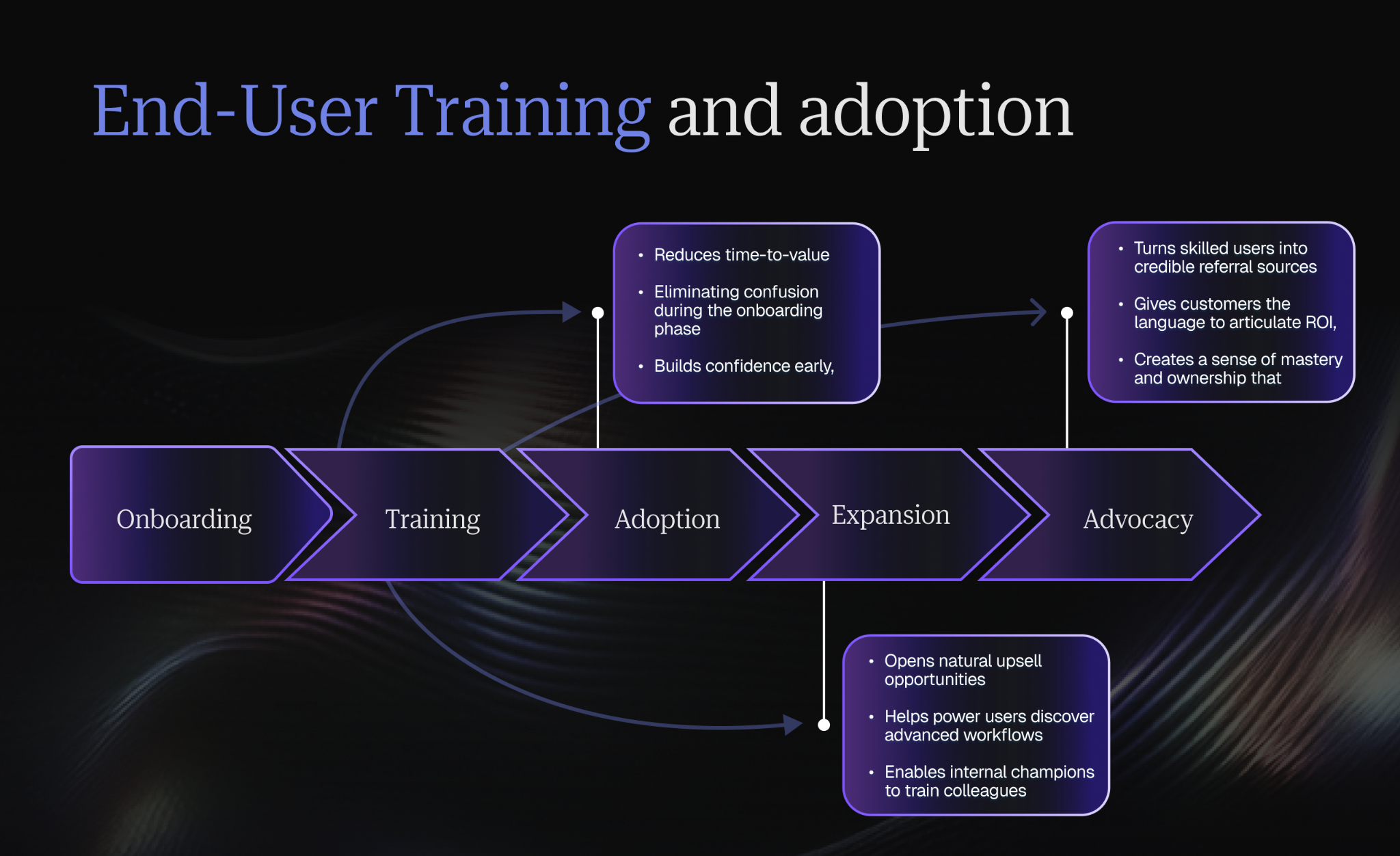
Product adoption doesn't happen automatically after purchase. You need to train your customers to use your product if you want them to see your solution as indispensable to their operations.
This is because when users feel confident and competent with your product, they're less likely to explore alternatives or let their subscriptions lapse. Training transforms your product from a nice-to-have into a must-have.
Training also helps address the knowledge gap that often causes early churn. Many customers cancel subscriptions not because the product doesn't work, but because they don't know how to make it work for them.
They struggle through the first few weeks, never discover the features that would solve their core problems, and eventually give up. Training prevents this by accelerating the path from "I purchased this" to "I can't live without this."
Continuous training modules lead to 20% higher feature adoption rates as customers gain confidence and explore deeper capabilities. Meanwhile, 84% of organizations with structured customer education programs report measurable retention gains, with trained cohorts showing significantly higher expansion and advocacy compared to untrained users.
Check out our strategic guide to customer lifecycle management for actionable tips on driving expansion and advocacy through every touchpoint.
Key components of successful end user training
Building an effective training program requires a few foundational elements that work together throughout the customer lifecycle.
Onboarding
Poor onboarding is one of the primary drivers of early-stage churn, typically occurring within the first 30-90 days when customers haven't realized value quickly enough. Research confirms that untrained users often churn due to unmet expectations rather than actual product shortcomings.
Your onboarding phase sets expectations for the entire customer relationship. The goal isn't to create product experts, but to help customers start realizing value fast enough that they stay engaged for deeper learning later.
Focus on helping users achieve their first win quickly rather than overwhelming them with every feature at once. Guide them through initial setup, highlight the most impactful capabilities for their use case, and build their confidence from day one.
The psychological principle here is momentum. That first success creates confidence and proves the product can deliver value. It answers the customer's underlying anxiety: "Did I make the right decision buying this?"
Once they have that confirmation, they're much more willing to invest time in deeper training.
For a comprehensive framework on getting customers to value quickly, see our guide on how to reduce time-to-value with proven strategies for faster customer success.
Continuous education
Products evolve, and your training should too. Continuous training is a core component of an effective customer lifecycle management strategy, ensuring customers extract maximum value at every stage of their journey. Think of this as nurturing your customer relationships over time, not just during the honeymoon period after purchase.
As you release new features and updates, keep customers informed through regular webinars, tutorials, and educational content. Continuous learning ensures customers don't plateau in their product usage and helps them discover capabilities they might have missed initially.
Continuous education also creates regular touchpoints that strengthen the customer relationship. When customers consistently hear from you with valuable insights, and not just sales pitches, they develop trust and see you as a partner in their success.
For application, create a content calendar that maps training topics to customer lifecycle stages and business seasons. For example, if you serve retailers, schedule training on reporting and analytics features before Black Friday, when they'll need those capabilities most. This contextual timing makes training feel relevant and timely rather than random.
Support resources
Even well-trained customers will have questions. Make sure they can find answers independently through comprehensive knowledge bases, FAQs, video libraries, and searchable documentation. Self-service resources reduce support burden while empowering customers to solve problems on their own schedule.
Self-service training resources also deliver quantifiable efficiency gains by reducing support ticket volume, empowering customers to solve common problems independently.
For practical application, track your most common support questions and create dedicated resources for each, and use actual customer language in your article titles. If customers search for "how to export contacts to CSV," use that exact phrase as your article title rather than something technical like "data extraction protocols.”
This autonomy creates a better experience and reinforces their confidence in using your product. Learn more about implementing proactive support strategies.
Tailored content
One-size-fits-all training rarely works well. Different user segments need different approaches based on their roles, technical proficiency, and intended use cases. A power user would need deep dives into advanced features, while a casual user might only need the basics.
For application, start by identifying your primary user personas, not just by company size or industry, but by role and use case. Survey customers to understand what success looks like for each persona, then map your features to those success outcomes. Build training paths that guide each persona toward their specific definition of value, using examples and language that resonates with their daily work.
Learn more about effective audience targeting in our ultimate guide to customer segmentation frameworks to build training paths that truly resonate with each user group.
How to design an effective training program
Creating training that actually works requires intentional design and planning before you create a single piece of content.
Conducting a training needs analysis
Start by understanding what your customers actually need to learn. Analyze support tickets to identify common confusion points, interview customers about their challenges, and review product usage data to see where people get stuck. This research ensures your training addresses real problems rather than theoretical ones.
Different customer segments will have different knowledge gaps. Map these out before building your curriculum so you're solving the right problems for the right people.
Afterwards, create a systematic needs analysis process that runs quarterly. Combine quantitative data (product analytics, support ticket categories, training completion rates) with qualitative insights (customer interviews, CSM feedback, user session recordings).
Look for patterns across both types of data. When the numbers and the stories align, you've found a real training opportunity.
Creating effective learning paths and curricula
Structure your training as a journey with clear milestones. Begin with foundational concepts, build toward intermediate skills, and finish with advanced capabilities. Each step should prepare users for the next while delivering standalone value.
Create logical progressions that mirror how customers actually use your product. If they need to complete Setup A before using Feature B, your training should follow that same sequence.
To implement this, map your customer journey from purchase to full value realization. Identify the key capabilities they need at each stage, and the order in which they naturally encounter challenges. Build your curriculum to match that natural progression. Include clear "you're ready to move on when you can..." checkpoints so customers know when they've mastered each stage.
Choosing the right content formats
Match your format to your content and audience. Videos work well for demonstrating processes, written guides excel at reference material, and interactive exercises help with skill-building. Most effective programs use a mix of formats to accommodate different learning preferences and use cases.
Consider when and how customers will access your training. Mobile users might prefer short videos, while desktop users might engage better with interactive tutorials.
Audit your current training content and identify which pieces are most critical for customer success. For those high-impact topics, test multiple formats with small customer segments and measure both completion rates and actual behavior change. Invest in professional production for formats that demonstrate the best results. For less critical topics, choose formats based on production efficiency. Sometimes a quick screencast video is perfectly adequate.
Designing for accessibility and inclusion
Accessible training isn't just about compliance, it's about ensuring every customer can succeed with your product regardless of their abilities or circumstances. Your training should work for everyone.
Treat accessibility as a baseline requirement, not an afterthought. When creating any training content, build in accessibility from the start: write scripts before recording videos (makes captioning easier), use heading structure properly in documents (helps screen readers), describe images in alt text (helps everyone), and test your content with keyboard-only navigation (catches interaction issues).
Use captions on videos, provide text alternatives for visual content, ensure sufficient color contrast, and support keyboard navigation. Consider offering content in multiple languages if you serve global markets.
Balancing self-serve and instructor-led approaches
Self-service training scales efficiently and lets customers learn at their own pace. Instructor-led sessions provide personalized guidance and real-time Q&A. The best programs combine both approaches strategically.
Use self-serve for foundational content that applies broadly, and reserve instructor-led sessions for complex topics, specialized use cases, or high-touch customer segments that justify the extra investment.
You’d start by mapping your training topics on two axes: complexity and universality. Topics that are simple and apply to everyone (basic setup, common workflows) should be self-serve. Topics that are complex but universal (advanced features) work well for webinars where many customers can benefit simultaneously. Topics that are both complex and specific (industry-specific use cases, technical integrations) justify instructor-led, personalized training.
Identifying Super Users
What defines a successful super user?
A super user is someone who’s naturally technically curious and eager to experiment with new capabilities. They should be respected by their peers, meaning their advice carries weight when they suggest new workflows. Crucially, they must have the capacity in their schedule to assist others, along with a genuine investment in their team’s collective performance.
Identifying high-potential candidates
Start by digging into your product analytics to spot users who consistently engage with advanced features. Combine this quantitative data with qualitative insights: notice who asks sophisticated questions in support tickets or who volunteered for the initial implementation. These are your most likely candidates for long-term super user status, as they have already demonstrated both engagement and a willingness to learn.
Providing value to your super users
To keep super users engaged, you must provide value in return for their effort. Grant them early access to beta features, which makes them feel like partners in your product's evolution. Provide a direct line of communication to your CS team, bypassing standard support queues, and publicly acknowledge their contributions in team or company-wide communications. When they feel their expertise is recognized, they are far more likely to remain invested.
The CSM's role in the partnership
Your relationship with a super user should be collaborative, not just transactional. Schedule regular check-ins to discuss their feedback and provide advance notice of upcoming product changes so they aren't caught off guard. Occasionally involve them in product feedback sessions or advisory calls; this not only gives them a sense of ownership but provides you with the ground-level insights necessary to improve your product.
Why this strategy works at scale
Empowering super users creates a force multiplier for your CS team. These super users help reduce the CSM training workload by turning your own customer into an extension of your training program. This shift can lower your support overhead and also improves adoption depth, as peers are often more comfortable asking colleagues for help than reaching out to external vendors.
Strategies for effective end-user training
Delivery matters as much as content. These strategies help ensure your training actually engages users and drives behavior change.
Overcoming resistance when customers don't want to be trained
Understanding why customers resist training is the first step toward overcoming it. Often, adoption resistance isn't a flaw in the training content itself but a symptom of underlying organizational friction.
To address this, Customer Success teams must pivot their focus away from just delivering content and toward addressing the internal processes and culture that dictate how change is received within the client's organization.
There are three common personas to look for:
- the "Time-Poor," who are overwhelmed by their daily tasks and require quick, demonstrable wins to justify any time spent learning
- the "Change-Skeptics," who have grown cynical after witnessing too many failed software implementations
- the "Status-Quo Defenders," who may resist new tools because they fear that learning new skills will inadvertently highlight past inefficiencies or make their current expertise obsolete.
To get internal buy-in, CS teams should utilize a whats-in-it-for-me framework. This involves tailoring messaging to specific user roles to show how the tool solves their unique, day-to-day pain points rather than just fulfilling high-level company goals.
An early-wins strategy is critical for building momentum. Start by identifying the most receptive and technically curious users since those most likely to succeed quickly. Once these early adopters secure a public success or reach a value milestone, use their experiences as internal case studies.
This provides the social proof necessary to win over doubters, as peers are often more influenced by the success of their own colleagues than by promises from an external vendor.
Interactive learning
Passive reading or watching rarely creates lasting knowledge. Build interactivity into your training to keep users engaged and help information stick.
Quizzes
Short knowledge checks at the end of modules reinforce key concepts and provide immediate feedback. They help users identify gaps in their understanding before moving forward, preventing confusion later.
If you use quizzes, design them to test understanding, not just memory. Instead of "What button do you click to create a report?" ask "A customer needs to see sales data grouped by region. Which report type should you create?" This tests whether they understand the concept and can apply it to real scenarios.
Videos
Visual demonstrations make complex processes easier to understand. Videos combine visual and auditory learning, which improves retention compared to text alone. Keep them focused and concise, and aim for 3-5 minutes per topic.
Script your videos before filming. This keeps you focused and prevents rambling. Start each video by stating exactly what the viewer will be able to do after watching. Use real examples and actual customer data (anonymized) rather than generic demonstrations. And always show the outcome first. Let viewers see the end result before you walk through the steps to create it.
For inspiration on creating engaging visual content, check out these product tour examples to improve user onboarding that demonstrate best practices in action.
Hands-on exercises
Practice solidifies learning. Give users opportunities to apply concepts in safe environments like sandboxes or demo accounts. Doing builds competence faster than watching or reading.
For practical application, create realistic practice scenarios based on actual customer use cases. Don't just say "try creating a report". Give them a specific goal: "Create a report showing all deals closing this quarter worth over $50k, grouped by sales rep." This simulates real work and helps users see the connection between training and their actual job responsibilities.
Applying adult learning principles
Effective training respects how adults actually learn and what motivates them to engage with educational content.
Reducing cognitive load in software training
Don't overwhelm users with information. Break complex topics into digestible chunks, focus on one concept at a time, and remove unnecessary details. Use clear visual hierarchy and familiar patterns to make content easy to scan and understand.
When introducing features, explain what it does and why it matters before diving into how to use it. Context reduces cognitive burden.
Ruthlessly edit your training content. For each piece of information, ask: "Does the learner absolutely need to know this right now to accomplish the task at hand?" If not, move it to advanced training or reference documentation. Use progressive disclosure and show only what's necessary for the current step, and reveal more complexity as users advance.
Motivating learners to complete training
Connect training directly to outcomes users care about. Instead of "Learn how to use Feature X," frame it as "Save 3 hours per week with automated workflows." Show the payoff upfront to create motivation.
Recognize progress with completion badges, certificates, or unlocked capabilities. Small wins along the way keep users moving forward.
Start every training piece with a clear outcome statement that includes measurable impact. Use actual customer testimonials showing results they achieved by mastering the concept. Build in small celebrations for completing sections. Even simple animations or congratulatory messages create positive reinforcement that encourages continued engagement.
Overcoming time constraints and objections
Busy users often say they don't have time to train. Combat this by offering microlearning: 5-10 minute modules that deliver specific value. Make training available on-demand so users can learn when it fits their schedule.
Demonstrate ROI clearly: "Investing 30 minutes in this training will save you 2 hours this month." Time-pressed users will prioritize training when they see it as a time investment, not a time cost.
To apply this, break training into the smallest viable units. A 30-minute comprehensive training session becomes six 5-minute modules users can consume incrementally. Track and display time investment versus time saved for each module. Create multiple entry points to training; not just scheduled sessions, but embedded help, contextual tooltips, and searchable micro-lessons users can access precisely when they need them.
Ongoing support and resources
Training doesn't end when the initial program concludes. Continuous access to learning materials ensures customers can refresh their knowledge and grow their skills over time.
Training materials
Maintain a library of up-to-date guides, tutorials, and reference documentation. Make these materials searchable and easy to navigate so users can quickly find answers to specific questions. Update content regularly as your product evolves.
Organize your knowledge base around customer questions and workflows, not your product's feature list. Use actual support ticket language for article titles. Regularly audit your content for accuracy, especially after product updates. Archive or redirect outdated content rather than leaving incorrect information that erodes trust.
Webinars
Host regular live sessions covering new features, advanced techniques, and best practices. Webinars create opportunities for real-time interaction and let you address questions from multiple customers simultaneously. Record sessions for on-demand access.
For practical application, promote webinars as collaborative learning experiences, not lectures. Encourage attendees to come with questions and challenges. Use polls and live Q&A to make sessions interactive. After each webinar, follow up with attendees offering related resources and next-step training. Track which webinar topics drive the highest post-event engagement and feature adoption—double down on those themes.
Support resources
Robust support channels like live chat, email, and knowledge bases give users multiple ways to get help when they need it. Quick access to support reduces frustration and prevents small issues from becoming major roadblocks.
Implement support as a multi-layered system. Use automation and self-service for common questions, but make it easy to escalate to human support when needed. Track not just response time but resolution time and customer satisfaction by channel. Identify patterns in support requests and feed those back into your training program. Common support questions should trigger new training content that prevents those questions from arising.
When to switch from training to co-ordinating
As your customer base scales, relying solely on your CSMs to deliver one-on-one training creates a significant capacity bottleneck since it cannibalizes the time they should be spending on strategic account planning, renewals, and expansion efforts.
Signs you have outgrown manual training:
- Training volume exceeds capacity: CSMs are spending a disproportionate amount of time on repetitive, standardized onboarding sessions.
- Inconsistent delivery: You notice significant variation in knowledge retention between customers managed by different CSMs, suggesting a lack of standardized training material.
- Strategic neglect: Your CSMs are unable to meet their goals for QBRs, expansion, or health monitoring because they are stuck in training calls.
Transitioning to a 'Coordinator' Model
The shift isn't about abandoning the customer, but about evolving the CSM’s role from 'trainer' to 'orchestrator.' Instead of teaching the steps themselves, the CSM identifies the customer's learning needs and guides them to the appropriate automated resources, such as your internal academy, self-serve knowledge base, or community forums.
To ensure a seamless transition:
- Standardize your 'core' curriculum: Move foundational product knowledge to an on-demand, self-serve format first.
- Create a transition path: Introduce your new training platform as a 'premium resource' that provides 24/7 access, rather than a cost-cutting measure.
- Focus on the 'Why': Explain that this change allows the CSM to focus on the customer’s business outcomes and strategic alignment, rather than administrative product walkthroughs.
- Maintain high-touch for high-value: Even as you scale, reserve live, high-touch training for complex integrations, executive workshops, or strategic workflow optimization.
Tools and technologies for end-user training
The right technology stack makes training more scalable, consistent, and effective. Learning Management Systems (LMS) like Moodle, TalentLMS, and Docebo provide centralized platforms for creating, delivering, and tracking training content.
For Customer Success teams specifically, purpose-built platforms like Velaris, a highly rated software on G2, offer capabilities that go beyond traditional LMS tools.
Automate and standardize training processes
Automation ensures every customer receives consistent, high-quality training regardless of when they are onboard or which CSM they work with. Standardized workflows that trigger training at appropriate points in the customer journey are particularly effective.
Playbooks help teams execute training processes consistently by mapping out exactly what should happen at each stage. This removes guesswork and ensures nothing is forgotten.
Automation also frees up CSM time. Tasks that previously required manual tracking like sending follow-ups, scheduling check-ins, and updating customer records now happened automatically. CSMs would be allowed to shift from administrative work to high-value activities like strategic planning and relationship building.
To standardize your training processes, map your ideal customer training journey from signup to full activation. Identify every touchpoint: emails, calls, training assignments, check-ins. Then automate the repeatable parts using workflows and triggers.
Document your best CSM's approach in playbooks that others can follow. Track variance in outcomes across team members. When you see inconsistency, that's an opportunity for better automation or clearer playbooks.
Discover how automation can transform your entire CS workflow in our guide on streamlining customer success with automation, including best practices for scaling training delivery.
Use AI to analyze customer interactions
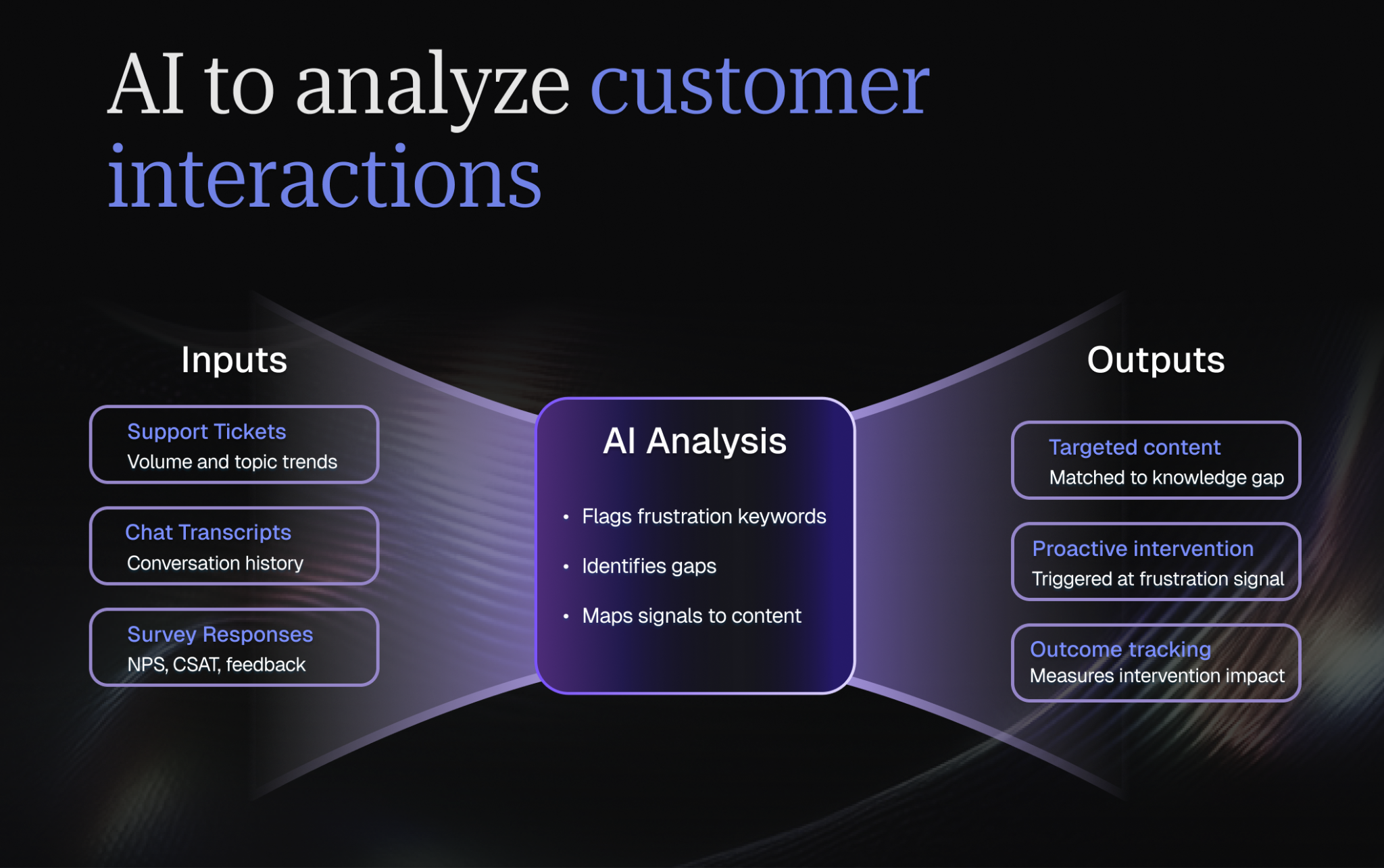
AI can identify patterns in customer behavior that signal training needs. When sentiment analysis detects frustration or confusion around specific features, you can proactively recommend targeted training content to address those gaps.
This data-driven approach ensures you're providing the right training at the right time based on actual customer signals, not assumptions.
For application, start collecting sentiment data from all customer interactions: support tickets, chat transcripts, survey responses, community forum posts. Use AI tools to identify keywords and phrases associated with success versus struggle. When you spot frustration signals, intervene immediately with relevant training. Track whether these interventions change outcomes.
Discover how to use AI for smarter customer satisfaction management and turn raw interaction data into proactive training opportunities.
Monitor customer health scores
Customer health scoring reveals which accounts might benefit from additional training. Declining health scores often indicate underutilization of your product, which is a problem training can solve.
By connecting training engagement to health scores, you can identify at-risk customers early and intervene with targeted education before churn becomes likely. Build training engagement into your health score model. Track which training milestones correlate most strongly with retention and expansion. Create automated alerts when customers fall behind on critical training. But don't just send generic "complete your training" emails. Personalize outreach based on the customer's specific role, challenges, and usage patterns. Make training feel like personalized support, not homework.
Learn how to build a data-driven customer health score to stay ahead of underutilization and intervene before your customers disengage.
Unify data from different teams
Break down silos between sales, marketing, onboarding, support, and product teams. When training programs draw on insights from across the customer journey, they address real pain points more effectively.
Integrated data helps you understand the full context of each customer's experience, allowing you to create comprehensive training that covers all aspects of their journey with your product.
For application, audit where customer information lives in your organization. Map all the systems: CRM, support, analytics, billing, training platform, communication tools. Identify the critical data points you need for effective training delivery. Then systematically integrate those systems, either through a unified platform or API connections. The goal is a 360-degree view that lets you deliver training based on the customer's complete journey, not just isolated snapshots.
Measuring the effectiveness of end-user training
You can't improve what you don't measure. Tracking the right metrics helps you understand whether your training programs are actually moving the needle on customer success.
Core engagement metrics
These foundational metrics show how users interact with your training content.
Engagement rates
Track how many customers actively participate in training opportunities. High engagement suggests your content is relevant and accessible. Low engagement signals you need to improve content quality, promotion, or accessibility.
When you track engagement, track it as a funnel: awareness (how many customers know training exists), interest (how many click or register), and participation (how many actually complete it). Identify where you're losing people and address that specific gap. Low awareness? Improve promotion. High awareness but low interest? Strengthen your value proposition. High interest but low completion? Fix the content or format.
Completion rates
Monitor what percentage of users finish the training they start. High dropout rates indicate content that's too long, too complex, or not valuable enough to justify the time investment.
Make sure to track completion rates by module or section to identify specific problem areas. If 90% complete Module 1 but only 40% complete Module 2, that module needs work. A/B test different approaches: shorten the content, add more examples, improve clarity, or make it optional. Also track time-to-completion. If it takes customers an average of 3 weeks to finish a program designed for 3 days, you need better engagement mechanisms.
Customer feedback
Direct user feedback reveals what's working and what's not. Survey participants about content quality, relevance, format preferences, and whether training helped them achieve their goals. This qualitative data provides context that numbers alone can't capture.
Make feedback collection systematic, not occasional. Send brief surveys after every significant training interaction. Ask open-ended questions that reveal "why" behind the ratings. Create a dedicated channel for customers to submit training suggestions.
Review feedback monthly and implement at least one improvement based on customer input. Close the loop—when you make changes based on feedback, tell customers about it.
Advanced metrics and ROI analysis
Beyond basic engagement, measure how training impacts business outcomes that matter to leadership.
Calculating training program ROI
Compare the cost of delivering training (time, tools, resources) against the value it generates (reduced churn, increased expansion revenue, lower support costs). ROI justifies continued investment in training programs and helps you prioritize improvements.
- Churn reduction
- Expansion revenue
- Support cost reduction
- Total measurable impact
This analysis transforms training from a "nice to have" expense into a strategic investment. Leadership approved budget increases for enhanced training capabilities, understanding the clear return.
Industry benchmarks support these findings, with training programs delivering ROI through 15-22% improvements in key metrics including churn reduction, expansion revenue, and lifetime value uplift. Cost-benefit analyses consistently show that revenue gains from reduced churn and increased renewals offset the investment in training infrastructure and delivery, making customer education one of the highest-return activities in the CS playbook.
Make sure to also focus on other relevant metrics like customer satisfaction scores, reviews mentioning training quality, and advocacy program participation. While harder to quantify, these contributed to brand reputation and new customer acquisition.
Identify all costs associated with your training program: tools, platforms, content creation time, delivery time, opportunity cost of CSM hours. Then track every measurable benefit: churn prevented, expansion generated, support costs saved, onboarding time reduced, sales cycle shortened (for customer references).
Calculate ROI quarterly and share results with leadership. When ROI is strong, advocate for increased investment. When it's weak, that's valuable data guiding where to improve.
Training completion vs. customer lifetime value
Analyze whether customers who complete training have higher lifetime value than those who don't. This correlation helps you quantify training's impact on revenue and makes a compelling case for prioritizing it.
Research consistently demonstrates that training completion strongly predicts higher customer lifetime value through multiple mechanisms: improved retention rates, increased expansion revenue, and higher advocacy behaviors. Comparative analyses of trained versus untrained customer cohorts reveal clear uplift in renewals, upsells, and referral activity, which are metrics that directly tie training investment to revenue outcomes beyond simple engagement statistics.
To do this, tag customers in your CRM or CS platform based on training completion milestones. Track their LTV, retention, expansion, and advocacy behavior compared to non-completers. Calculate the marginal value of training completion. Use this data to justify training investments and to identify which training milestones drive the highest value. If advanced training shows strong LTV correlation, invest more in encouraging customers to pursue it.
Impact on time-to-value
Measure how quickly trained customers achieve their first success compared to untrained ones. Faster time-to-value reduces early churn risk and accelerates the path to renewal and expansion.
Reducing time-to-value through training is particularly critical in product-led growth models, where customers need to experience tangible benefits quickly to justify continued investment. Trained users consistently hit value milestones faster than untrained counterparts, with median time-to-value improvements clearly visible when comparing cohorts by training completion status.
Make sure you clearly define what "first value" means for your product: the specific milestone that indicates a customer is getting real benefit. Track time from signup to that milestone for all customers, segmented by training completion. If trained customers reach it significantly faster, that's compelling evidence for making training more prominent or even required. Build time-to-value tracking into your CSM dashboards so teams can proactively intervene when customers are taking too long.
Training's effect on support ticket reduction
Track support ticket volume for trained versus untrained customers. Effective training should reduce tickets by helping users solve problems independently. Lower support volume translates to cost savings and better customer experience.
Tag support tickets with customer training status so you can analyze volume and type by segment. Identify which training modules reduce which types of support tickets. If "data import" training dramatically reduces import-related tickets, make sure all customers complete that module early. Calculate the support cost savings from training and include it in your ROI analysis. Share these insights with your support team. They'll become advocates for training when they see it making their jobs easier.
Predicting churn through training engagement patterns
Training engagement can be an early warning signal. Customers who skip training or fail to complete it often have higher churn risk. Use these patterns to identify at-risk accounts that need intervention.
This approach is validated by industry data showing that low training engagement serves as a reliable early warning signal for customer health risks. Drop-off patterns in training participation often precede churn events by weeks or months, giving CS teams valuable time to intervene. Conversely, customers who re-engage with training after a period of inactivity frequently show improved retention and expansion potential.
Build training engagement metrics into your churn prediction model. Track not just completion but recency: when was the last time each customer engaged with training? Create automated alerts when engagement patterns change significantly. Train your CSMs to view training engagement as a diagnostic tool: low engagement signals risk, resumed engagement after a lull signals recovery, and sudden interest in advanced training signals expansion opportunity.
Creating feedback loops for continuous improvement
Use the data you collect to regularly refine your training programs. Update outdated content, improve low-performing modules, and double down on what's working well.
Build systematic processes for gathering user feedback through surveys. Net Promoter Score (NPS), Customer Satisfaction (CSAT), and Customer Effort Score (CES) all provide valuable insights into training effectiveness.
Make iteration part of your training culture. The best programs evolve continuously based on customer needs and business outcomes.
For the best results,, don't stop at collecting metrics. Act on them systematically. Create a regular cadence (monthly or quarterly) for reviewing training performance. Use a consistent framework for evaluating content. Dedicate capacity to continuous improvement. Don't let it become a "when we have time" activity. Involve CSMs and customers in the improvement process through feedback sessions and beta testing. Celebrate improvements publicly when they drive better outcomes. Make iteration visible so customers see that their feedback matters and drives real change.
Connecting training outcomes to customer business results
Completion rates and engagement metrics only prove that a training program occurred; they don't prove it delivered business value. To make training demonstrably investable, Customer Success teams should use the following three-step framework to connect training events to specific customer outcomes:
1. Identify the 'Success Metric': Start by defining what the customer is actually trying to improve. This could be reducing the time spent on a manual task, decreasing the error rate in data entry, or increasing the number of processes automated per week. Without a baseline metric, the impact of training remains invisible.
2. Map Training to KPI Impact: Establish a clear logic chain from the skill being taught to the business outcome. For example, if a user learns how to use "Feature X," it directly enables them to "Automate Workflow Y," which results in "Z hours saved per month." Mapping these connections ensures the curriculum is focused on high-impact activities.
3. Correlate Data: Track the performance gap between trained and untrained cohorts. By comparing the productivity or error rates of users who have completed the training against those who haven't, you can isolate the "training lift" and assign a specific dollar or time value to the educational intervention.
Note: When presenting results to stakeholders, always prioritize reporting on these tangible business outcomes rather than just completion rates. Executives care about ROI and efficiency gains, not how many people clicked through a slide deck.
Conclusion
Effective end-user training is fundamental to Customer Success, not optional. When you invest in comprehensive onboarding, continuous education, and accessible support resources, you empower customers to fully leverage your product's value.
But training isn't just good for customers, it's transformative for your business. The data is clear across industries and use cases: trained customers have higher lifetime value, lower churn rates, faster time-to-value, and stronger advocacy. They require less support, expand more frequently, and become partners in your success rather than accounts to manage.
Most importantly, remember that training is ultimately about helping customers succeed. When you frame every decision through the lens of “What will help customers achieve their goals faster and more confidently?”, you'll build training programs that deliver lasting impact.
Book a demo to see how Customer Success teams use Velaris, a highly rated software on G2, to deliver scalable, data-driven training.
Frequently Asked Questions
How early should end-user training start after a customer signs?
End-user training should begin as soon as the customer has access to the product, but it shouldn’t arrive as a heavy or formal program.
The goal in the first few days isn’t mastery, but reassurance. Users are subconsciously asking whether they made the right decision, and early training should answer that question by helping them achieve one concrete result quickly.
Who should own end-user training: Customer Success, Product, or Enablement?
Ownership should sit with Customer Success because training directly impacts retention, expansion, and long-term outcomes. CS teams are closest to customer goals, objections, and friction points, which makes them best positioned to decide what users actually need to learn and when.
How do you encourage users who ignore training to actually engage?
The fastest way to increase engagement is to stop treating training as a separate activity and framing it as a way to remove obstacles and save time.
Users often ignore training because it feels disconnected from their immediate priorities. Instead of asking users to attend sessions, embed training into moments of action or friction, like when a user is trying to accomplish something and needs help immediately. This can include contextual prompts, short walkthroughs triggered by behavior, or targeted recommendations based on usage gaps.
What’s the biggest mistake teams make when building training programs?
The biggest mistake is assuming that more information equals better training. Many programs overload users with comprehensive explanations, edge cases, and advanced options before users are ready for them.
Effective training is selective and intentional. It focuses on what users need to succeed right now and defers everything else. When training is built around the user’s priorities instead of the product’s full capabilities, it feels practical and relevant.
How do you scale training without losing personalization?
Scalability doesn’t come from generic content, it comes from structured personalization. By breaking training into small, role-based modules and assigning them dynamically, teams can deliver highly relevant experiences at scale.
The key is using customer data such as role, industry, lifecycle stage, and product usage to determine which content appears and when.
When should training be mandatory versus optional?
Training should only be mandatory when skipping it creates measurable risk, such as incorrect configuration, compliance exposure, or failure to achieve core value. In those cases, requiring training protects both the customer and your business.
For everything else, optional training paired with strong incentives tends to perform better.

The Velaris Team
A (our) team with years of experience in Customer Success have come together to redefine CS with Velaris. One platform, limitless Success.




Velaris is an AI-native Customer Success Platform built for mid-market and enterprise B2B SaaS teams. From customer health scoring and churn prediction to onboarding automation, renewals, and expansion workflows, Velaris helps recurring revenue teams understand account health, reduce churn, and scale customer success with greater visibility and control.