We look forward to showing you Velaris, but first we'd like to know a little bit about you.


The Ultimate Guide to Increasing User Engagement in B2B SaaS
Find out how to increase user engagement with practical strategies like automated outreach, feedback loops, and feature adoption.
The Velaris Team
March 14, 2026
This guide helps B2B SaaS leaders, customer success teams, and product managers systematically increase user engagement to drive retention, expansion, and advocacy.
It explains how engagement differs in B2B, shows how to measure and act on it, and provides strategies from personalized outreach and feature adoption guidance to community building and education so teams can deliver meaningful value at every stage of the customer journey.
Use it when designing, scaling, or optimizing engagement programs to turn product usage into measurable business outcomes.
Key Takeaways
- B2B SaaS engagement centers on value realization: users must achieve measurable business outcomes.
- Segment users by behavior and firmographics to personalize outreach, messaging, and content effectively.
- Proactive, behavior-triggered communication and milestone recognition prevent disengagement and drive adoption.
- Continuous education, in-app guidance, and contextual product tours encourage feature discovery and deeper usage.
- Engagement data predicts churn and identifies expansion opportunities, guiding CSMs where to intervene.
- Communities, webinars, and role-based learning paths foster advocacy and long-term retention.
How is user engagement in B2B SaaS different?
B2B SaaS engagement looks fundamentally different from B2C because you're not just dealing with individual users. The stakes are higher because disengaged users can influence entire departments or trigger company-wide vendor changes.
Unlike consumer products where engagement might mean daily app opens or social shares, B2B engagement centers on value realization. Are users actually accomplishing their goals? Are they adopting features that deliver ROI?
Your engagement strategy needs to account for varying technical skill levels, different use cases across departments, and the reality that your champion might leave the company at any moment.
Understanding the foundations of user engagement
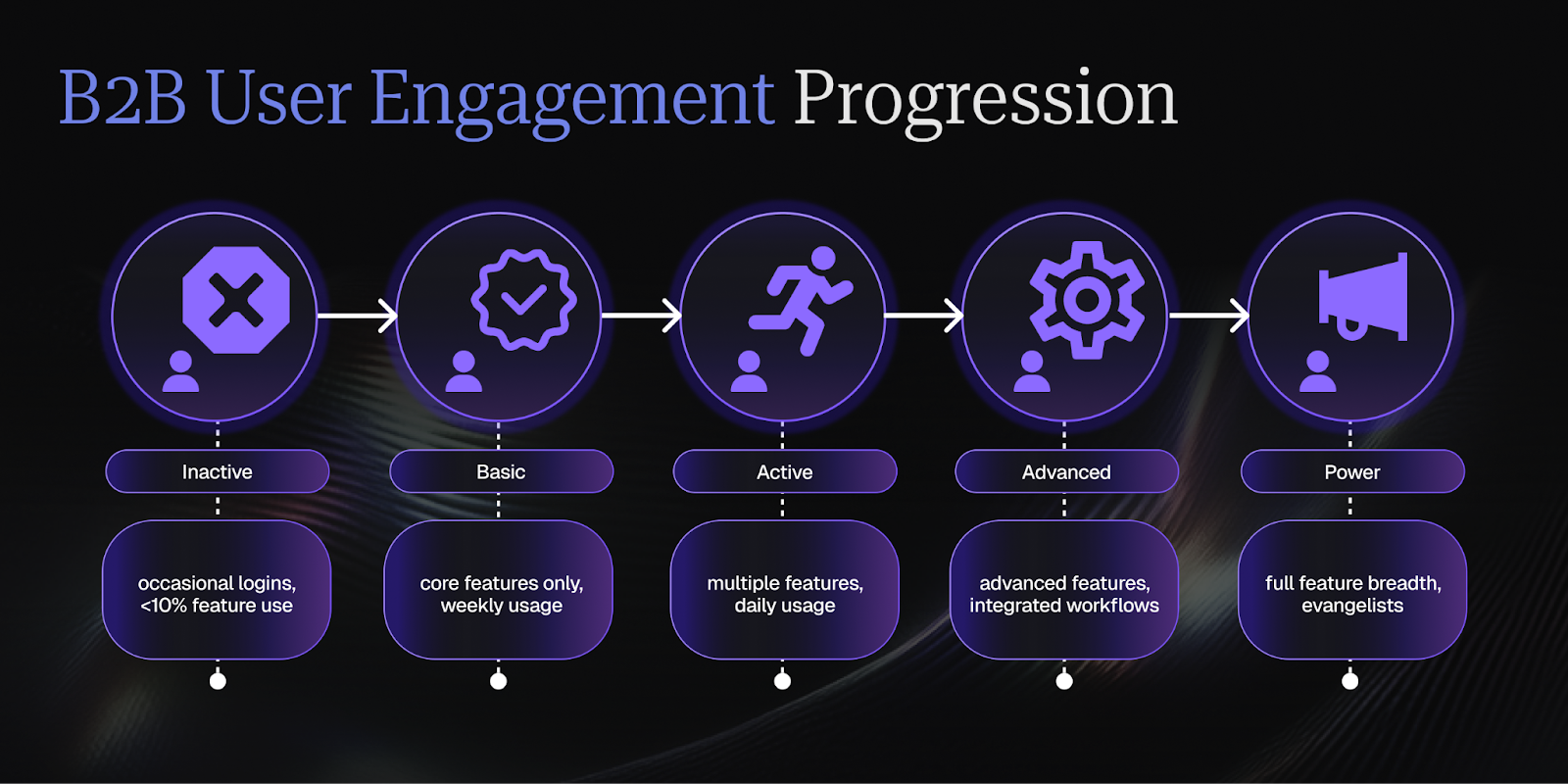
Strong user engagement starts with a clear understanding of what it actually means in your specific context. At its core, engagement measures how actively and meaningfully customers interact with your product to achieve their desired outcomes. But that definition needs to be grounded in specific, measurable behaviors that matter for your business.
Think about engagement as existing on a spectrum. On one end, you have passive users who log in occasionally but never progress beyond basic features. On the other, you have power users who've integrated your product into their daily workflows and regularly explore advanced capabilities. Your job is to move users along this spectrum systematically.
The foundation of any engagement strategy is understanding user intent. Why did they buy your product? What problem are they trying to solve? What does success look like for them? Once you understand these fundamentals, you can design engagement touchpoints that genuinely help users rather than just creating noise in their inbox.
How engagement impacts retention and growth
Engagement isn't a vanity metric. It's the leading indicator that predicts whether customers will renew, expand, or churn. Research shows that customers with higher engagement scores are statistically more likely to renew, with post-renewal engagement rate benchmarks demonstrating that users actively engaging with core features retain at significantly higher rates than low-usage cohorts.
In contrast, reduced engagement, such as 30+ days of inactivity, is widely-cited as one of the strongest early warning signals for churn in SaaS contexts, making engagement metrics not just descriptive but truly predictive.
Highly engaged customers are more likely to become advocates who drive referrals, case studies, and community participation, turning your investment in engagement into a sustainable growth engine. They speak at your events and participate in your community. This advocacy creates a flywheel effect where engagement drives retention, retention enables expansion, and expansion funds the acquisition of more customers who you can engage.
Discover how to build predictive models that catch these signals earlier in our article on churn prediction models and how to build them.
The connection between engagement and customer success
Customer Success teams exist to ensure customers achieve their desired outcomes with your product. Engagement is the mechanism through which this happens. You can't deliver customer success without active product usage, feature adoption, and ongoing interaction with your team and resources.
Think of engagement as the daily work of Customer Success, while outcomes are the quarterly or annual results. Every engagement touchpoint—whether it's a product tour, a quarterly business review, or an automated email—should ladder up to helping customers achieve their goals. If it doesn't, it's just noise.
The most effective CS teams use engagement data to prioritize their time. Instead of spreading themselves thin across all accounts, they focus high-touch efforts on customers showing early warning signs of disengagement while using automation to maintain engagement at scale for healthy accounts. This data-driven approach ensures you're intervening at the right time with the right message.
Personalize every interaction at scale
Segment users based on behavior and demographics
Effective segmentation starts with combining behavioral data with firmographic information to create meaningful user groups. Are they power users or casual users? Which features have they adopted? Then layer in company size, industry, role, and lifecycle stage.
The key is creating segments that actually change how you engage. Each segment should have distinct pain points, goals, and preferred communication styles that inform your outreach strategy.
Start with three to five core segments rather than trying to create dozens of micro-segments. You might have:
- new users still in onboarding
- active users who've adopted core features
- power users exploring advanced capabilities
- at-risk users showing declining engagement
- enterprise accounts requiring white-glove service.
As your program matures, you can add more nuanced segments.
Tailor communication to user needs and goals
Once you've segmented your users, customize your outreach to each group by creating messaging frameworks that address the specific pains, challenges and goals. New users need onboarding guidance and quick wins. Active users want tips to work more efficiently. Power users are looking for advanced techniques and early access to new features. At-risk users need intervention and support.
Pay attention to communication preferences too. Some users love detailed email updates; others want brief in-app notifications. Some prefer video tutorials, while others want written guides. Let users choose their preferred channels and content formats, then respect those preferences. This builds trust and increases the likelihood they'll engage with future communications.
Use dynamic content for relevant messaging
Dynamic content lets you create one email template or in-app message that automatically adjusts based on who's viewing it. You might show different feature recommendations based on usage patterns, different case studies based on industry, or different CTAs based on account size. This makes your communications feel personal without requiring manual customization for every user.
The technology behind this is straightforward. You're using merge tags and conditional logic to pull relevant information from your customer data. But the strategy requires thinking through which variables actually drive different messaging. Does knowing someone's job title change what resources you'd recommend? Does their feature adoption level determine which next step makes sense?
But keep it subtle. If users notice you're dynamically inserting their name or company everywhere, it feels gimmicky. If they simply receive content that always seems relevant to their situation, that's when personalization creates real impact.
Proactive outreach
Automate touchpoints based on user behavior
Behavioral automation means setting up triggered communications that respond to specific user actions or inactions. This approach is supported by engagement analytics research showing that declines in key behavioral signals such as extended inactivity or narrowing feature breadth tend to precede formal churn events, meaning that well-timed, trigger-based outreach can intercept disengagement well before contracts are at risk.
The power of behavioral triggers is perfect timing. Instead of sending monthly newsletters that might or might not be relevant, you're reaching out at the exact moment when users need help or are ready for the next step. This contextual relevance dramatically improves engagement rates compared to calendar-based campaigns.
Velaris, recognized on G2 for its time-saving automation features, makes behavioral automation straightforward with pre-built playbooks that trigger based on user actions and customer journeys. From re-engagement sequences to milestone celebrations, the platform orchestrates timely outreach so your team can focus on high-value conversations rather than managing email queues.
Celebrate milestones and achievement moments
Recognition is a powerful engagement driver that most B2B companies underutilize. When users hit meaningful milestones—first project created, 100th task completed, six months as a customer—acknowledge it. These celebrations reinforce positive behaviors and create emotional connections to your product.
Celebration doesn't require elaborate gestures. A simple congratulatory email, an in-app notification with confetti, or a personalized video from their CSM can make users feel valued. For major milestones with high-value accounts, consider sending small gifts or featuring them in your customer spotlight.
Identify and address engagement gaps early
Early detection of disengagement requires monitoring leading indicators rather than waiting for obvious red flags.
Build engagement scoring models that weight different behaviors based on their correlation with retention; and look for subtle changes in behavior like decreasing login frequency, reduced feature adoption, longer gaps between active sessions, or declining interaction with your content and team.
These signals often appear weeks or months before a customer formally churns. The key to addressing gaps is making outreach helpful rather than desperate. When scores drop below certain thresholds, trigger intervention workflows that offer support before problems escalate.
Position yourself as a partner helping them get more value, not a vendor worried about losing revenue.
Encourage feature discovery and deeper product usage
Use in-app messaging and product tours effectively
Data from product engagement benchmarks consistently shows that customers who adopt a broader set of features demonstrate disproportionately higher retention and expansion rates compared to shallow users, reinforcing the importance of structured feature adoption paths rather than relying solely on login frequency as an engagement signal.
In-app messaging and product tours let you guide users without pulling them out of their workflow.
The most effective product tours are short, skippable, and focused on immediate value. Show them the three things they need to accomplish their first goal. Let them opt out with a "show me later" option rather than forcing completion. And avoid notification fatigue by being strategic about when and how often you use in-app messages, because you don’t want to overwhelm users with too many simultaneous prompts.
Implement contextual tooltips and walkthroughs
Contextual tooltips explain specific features or buttons when users hover over them or first encounter them. Unlike full product tours, tooltips are lightweight and non-intrusive. They provide just enough information to help users understand what something does without interrupting their flow.
Walkthroughs guide users through multi-step processes, highlighting each action in sequence. These work well for complex workflows that users do infrequently, like setting up integrations, configuring advanced settings, or running their first report. The walkthrough provides guardrails that build confidence without requiring constant hand-holding.
The balance is knowing when to educate and when to let users explore. Power users find excessive guidance annoying, while novices appreciate clear direction. Consider offering a "show me how" option that users can activate when they need help rather than automatically launching walkthroughs for everyone.
Time feature introductions based on user readiness
Introducing features too early overwhelms users; introducing them too late means they miss out on value. The sweet spot is introducing new capabilities right when users have mastered the basics and are ready for the next level.
This requires tracking progress through your feature hierarchy and understanding which features naturally build on others. Once you do, create feature adoption paths that reflect how users naturally expand their usage.
Readiness also depends on time in product and overall engagement level. A user in their first week needs to focus on core functionality regardless of their technical sophistication. Even power users need time to build habits around basic features before expanding into advanced territory.
Create a feedback loop and act on user input
Conduct regular pulse surveys (NPS and CSAT)
Pulse surveys provide regular health checks on customer sentiment without the survey fatigue of lengthy questionnaires. NPS (Net Promoter Score) measures overall satisfaction and likelihood to recommend. CSAT (Customer Satisfaction) measures satisfaction with specific interactions or features. Together, they give you both macro-level sentiment and granular feedback on specific experiences.
Timing matters enormously for surveys. NPS is best sent at quarterly or biannual intervals, and CSAT surveys should be sent immediately after key interactions like post-support ticket, post-onboarding, or after major product updates. This captures feedback while the experience is fresh and allows you to correlate responses with specific events.
Always keep surveys short. For NPS, ask the 0-10 rating question plus one follow-up asking why they gave that score. For CSAT, ask the satisfaction rating plus what could have been better. Respect respondents' time and you'll get higher response rates and more thoughtful answers.
To learn more about extracting actionable insights from customer feedback, explore our guide on using sentiment analysis to improve customer experience.
Automate feedback collection after key interactions
Automated feedback collection ensures you're consistently gathering input at important touchpoints without manually sending individual surveys. This includes setting up workflows that trigger surveys after support tickets close, onboarding completes, training sessions end, or users adopt new features. A systematic approach prevents feedback gaps where you're only hearing from users who proactively reach out.
Track response rates and follow up on non-responses selectively. If a high-value customer doesn't respond to a post-onboarding survey, their CSM might reach out personally. But don't badger users with reminder after reminder, because one polite follow-up is usually sufficient.
With Velaris, you can set up automated pulse surveys that trigger after key milestones and funnel responses directly into customer health scores. The AI layer analyzes sentiment trends and surfaces actionable patterns, turning feedback into intelligence without manual analysis.
Close the loop by acting on user suggestions
Collecting feedback is pointless if you don't act on it. Close the loop by responding to survey feedback, especially from detractors and users who report problems. Let them know you've heard their concerns and explain what you're doing about it. This transforms a negative experience into a demonstration that you actually care about their input.
For feature requests and product suggestions, create a transparent process for evaluating, prioritizing, and implementing user ideas. Not every suggestion can be built, but users should understand how decisions are made. When you do build something requested by users, announce it and specifically thank the customers who suggested it.
Share aggregate feedback insights with your broader team. Product needs to see recurring pain points. Marketing needs to know what messaging resonates. Leadership needs to understand sentiment trends. Feedback should inform decisions across the organization, not just sit in a database.
Build and nurture a user community
Create forums and user groups for peer learning
User communities create spaces where customers help each other, reducing support burden while building stronger connections to your product.
Forums work well for asynchronous Q&A where users can search for existing answers or post new questions. User groups, whether that’s Slack channels, LinkedIn groups, or dedicated platforms, enable more conversational, relationship-driven interaction.
Different users want different types of communities. Some prefer open forums where anyone can participate. Others want exclusive groups segmented by role, industry, or account tier. Consider creating multiple community spaces that serve different needs rather than forcing everyone into a single catch-all group.
The key to successful communities is making them genuinely useful. Seed initial content with helpful how-to guides, best practices, and common use cases. Have your team actively participate by answering questions, sharing tips, and facilitating discussions. But the goal is peer-to-peer interaction, not just official company responses.
Incentivize participation and contribution
Most users will lurk in communities without actively contributing unless you give them reasons to participate. Recognition is powerful, and this can be achieved when you highlight top contributors, feature excellent answers, create badges or status levels that acknowledge participation. Some companies create formal ambassador or champion programs with exclusive perks for active community members.
The key is making the incentives align with behaviors you actually want like quality answers over quantity of posts, helping other users over self-promotion, substantive contributions over superficial activity.
Some companies create formal customer advocacy programs with exclusive perks for active community members, and the ROI is clear: highly engaged customers become advocates who drive referrals, case studies, and community participation, turning engaged users into your most powerful growth channel.
Host regular events and webinars
Live events create energy and urgency that asynchronous communities can't match. Regular webinars—whether training sessions, feature deep-dives, or customer spotlights—give users reasons to stay engaged and learn from each other. Virtual events are scalable; in-person gatherings create deeper connections but require more investment.
Vary your event formats to appeal to different preferences and goals. Training webinars help users improve their skills. Office hours let users ask questions directly to your team. Customer panels showcase success stories. And partner events introduce complementary solutions. Mix educational content with networking opportunities.
Several things to keep in mind when hosting events:
- Try to make events interactive rather than passive with polls, Q&A, breakout rooms, and chat to encourage participation.
- Record sessions for users who can't attend live, but create enough live-only value that people prioritize showing up in real-time.
- Always follow up after events with resources, recordings, and next steps.
Offer continuous education and value-add content
Develop role-based learning paths
Role-based learning acknowledges that a marketing manager and a finance director have completely different needs even if they use the same product. Create curricula organized by role, showing users exactly which features and workflows matter for their job function. This makes learning feel relevant and achievable rather than overwhelming.
Make learning paths self-serve but also offer guided options. Some users want to explore at their own pace; others prefer structured cohorts with deadlines and accountability. Offering both options maximizes participation across different learning styles and time availability.
Create webinars, tutorials, and certification programs
Educational content comes in many forms, and users have different preferences for how they learn. Webinars work well for live interaction and timely topics.
The business case for educational content shows that participants in education programs such as training, webinars, and certifications retain and expand at higher rates than non-participants, making these investments direct drivers of revenue outcomes beyond just product knowledge.
Certification programs add credibility and motivation to your education efforts. Users can prove their expertise, which has career value beyond just knowing your product better. Certifications also help you identify power users who might become advocates, reference customers, or community leaders.
Learn how to design comprehensive programs that drive engagement and product mastery in our customer education program guide.
Use email drip campaigns for progressive learning
Email drip campaigns deliver educational content over time, preventing overwhelm while maintaining consistent engagement. New users might receive daily onboarding tips for two weeks. Users who've mastered basics might receive weekly intermediate techniques. Power users get monthly advanced strategies and early access to new capabilities.
Structuring drip campaigns as journeys with clear beginnings and ends makes users feel like they're progressing through a curriculum, rather than receiving random tips indefinitely. Including progress indicators shows users know how far they've come and what's left.
Personalize drip timing based on user behavior. If someone completes the action from email #3 before email #4 arrives, skip ahead. If they haven't engaged with several consecutive emails, pause the drip and try a different approach. Behavioral triggers make drips feel responsive rather than robotic.
How to measure user engagement: Key metrics and KPIs that matter
Track active usage and feature adoption rates
Active usage metrics tell you how often users interact with your product. Daily Active Users (DAU) and Monthly Active Users (MAU) are starting points, but dig deeper. How many days per week do users log in? How long are typical sessions? Are usage patterns consistent or sporadic? Frequency and depth of engagement often matter more than raw login counts.
Segment usage metrics by customer cohort, account size, and lifecycle stage. What's normal for an enterprise account looks very different from a startup. What's expected in month one differs from month twelve.
Feature adoption rates show which capabilities users actually use versus what they're paying for. Calculate adoption as the percentage of users who've activated each feature within a relevant timeframe. Track both breadth (how many features users adopt) and depth (how actively they use key features). Low adoption indicates either poor feature discovery or features that don't deliver value.
Understanding these patterns helps you set appropriate benchmarks and identify outliers who need attention.
Monitor engagement score vs customer health score
Engagement score measures product usage and interaction levels. Customer health score is broader, incorporating engagement plus relationship factors (NPS, executive alignment), business outcomes (ROI, goal achievement), and commercial factors (expansion potential, payment history). Both metrics matter but serve different purposes.
Engagement score is your early warning system. It drops before health score does because usage changes precede relationship deterioration. A customer might still seem healthy in quarterly reviews while their daily usage has quietly declined. By the time health score flags risk, disengagement is well advanced.
The ideal is high alignment between engagement and health. Highly engaged customers should have strong health scores. Low engagement should correlate with health concerns. Misalignment—high engagement but low health, or vice versa—indicates something unusual that deserves investigation. Maybe they're using the wrong features, or perhaps they're happy but haven't seen business results yet.
Learn how to build an effective health scoring framework in our complete guide to health scores for Customer Success.
Set benchmarks for different customer segments
Aggregate benchmarks hide important patterns. The "average" customer is often not representative of any particular segment. To address this, establish separate benchmarks for enterprise vs. mid-market vs. SMB, for different industries, for various use cases etc. What's excellent engagement for one segment might be concerning for another.
Make sure to build benchmarks from your own data rather than industry averages from random sources. Look at your healthiest, highest-retaining customers and what their usage patterns look like. That's your benchmark. Compare other customers against these patterns to identify who's tracking well versus who needs intervention.
In the long-term, update benchmarks regularly as your product and customer base evolves. What was good engagement two years ago might be mediocre now if you've added features that should be driving more activity. Seasonal patterns also matter. Engagement might naturally dip during certain months in your users' business cycles.
Calculate ROI on engagement initiatives
Every engagement initiative requires investments like staff time, technology costs, and content creation. Measure whether these investments pay off by tracking leading indicators (engagement metrics) and lagging indicators (retention, expansion, advocacy). A successful engagement program should demonstrate clear impact on business outcomes.
Compare cohorts who receive different levels of engagement activity. Do customers who complete your certification program have higher retention? Do users who attend webinars expand at higher rates? Do community participants require less support? These comparisons help you prioritize which engagement initiatives deserve more investment.
ROI isn't always immediate. Educational programs might take six months to impact retention. Community building might take a year to reduce support costs meaningfully. Look at both short-term engagement lift and long-term business outcomes. The goal is sustainable impact, not just quick wins.
What causes users to engage: The psychology behind user behavior
Understand intrinsic vs extrinsic motivation
Intrinsic motivation comes from internal satisfaction like the enjoyment of the work itself, the pride of mastery, the fulfillment of accomplishing goals. Extrinsic motivation comes from external rewards such as recognition, status, tangible benefits.
Both drive engagement, but intrinsic motivation creates more sustainable, long-term behavior change.
In B2B contexts, strong intrinsic motivators include making the user's job easier, helping them achieve professional goals, enabling them to do higher-value work, and solving genuine pain points. These motivations are powerful because they align your product's success with the user's personal success. When your product helps someone look good at work, they're intrinsically motivated to use it well.
Extrinsic motivators like gamification, badges, or rewards programs can work but often feel gimmicky in professional contexts. Use them selectively and ensure they reinforce behaviors that create real value. A badge for completing training makes sense; a badge for logging in five days straight might not. The extrinsic reward should celebrate intrinsically valuable achievements.
Create habit-forming product experiences
Habits form through the trigger-action-reward cycle. A trigger (email notification, calendar alert, business need) prompts an action (logging into your product), which provides a reward (completing a task, getting insight, solving a problem). Repeat this cycle enough times and it becomes automatic, causing users to think of your product whenever that trigger occurs.
The most powerful triggers are internal, like feeling stuck on a problem, needing to check something, wanting to update information. Your product becomes the go-to solution. Build toward this by initially using external triggers (notifications, reminders, emails) that help establish the routine, then gradually reduce them as the habit solidifies.
Make the action as easy as possible. Every friction point in your user experience makes habit formation harder.
Design "aha moments" that drive stickiness
The "aha moment" is when users first experience meaningful value from your product. For some products it's completing a key workflow. For others it's seeing their first report or dashboard. For collaboration tools it might be the first time a team member responds to something they shared. Identify what this moment is for your product and engineer the experience to help users reach it quickly.
Time-to-value matters enormously. If users don't reach their aha-moment within the first few sessions, they'll likely abandon the product before experiencing its benefits. Map the shortest path from signup to value delivery and remove every unnecessary step. Anything that doesn't directly contribute to reaching the aha moment is friction.
For comprehensive strategies on accelerating this process, read our guide on how to increase product adoption.
Apply behavioral triggers and rewards effectively
Behavioral triggers prompt action at moments when users are ready to engage. Some examples are:
- Emailing someone a summary of activity in their account each Monday morning when they're planning their week.
- Sending a notification when someone @mentions them when they need to respond.
- Alerting power users when new features launch only when they're hungry for advanced capabilities.
Timing is crucial. A perfectly crafted message at the wrong time gets ignored. An okay message at the perfect time drives action. Test different timing windows to find when your users are most receptive. Early morning might work for some audiences while end-of-day works for others.
Rewards should feel earned and meaningful. Celebrating someone's 100th login is arbitrary. Celebrating that they've completed 100 projects with your tool recognizes real accomplishment. Variable rewards where users don't know exactly what they'll get can be more engaging than predictable rewards, but be careful not to make things feel manipulative in professional contexts.
How to structure your team for maximum user engagement
Determine optimal CSM-to-customer ratios
CSM-to-customer ratios vary dramatically based on your service model and account complexity. High-touch enterprise accounts might warrant 1:20 or even 1:10 ratios where CSMs provide white-glove service. Mid-market might work at 1:50 with a blend of proactive and reactive support. Volume SMB accounts might need 1:200+ with heavily automated engagement.
- Consider total ARR per CSM and complexity of implementation. Managing 50 straightforward accounts might be easier than managing 20 highly customized enterprise deployments.
- Factor in onboarding time, integration complexity, and number of stakeholders when calculating capacity.
Monitor CSM workload and burnout signals carefully. If CSMs are constantly firefighting with no time for proactive engagement, your ratios are too high. If they're struggling to fill their days, they might be able to handle more accounts. Track key metrics like response time, task completion rates, and customer health trends to optimize CSM-to-customer ratios over time.
Decide between generalist vs specialist roles
Generalist CSMs manage the full customer lifecycle from onboarding through renewal and expansion. This creates continuity and strong relationships but requires broad skill sets. Specialist models divide responsibilities like onboarding specialists, adoption specialists, and renewal specialists, allowing deeper expertise in each area but requiring smooth handoffs.
The right model depends on your product complexity and customer needs. Complex enterprise products often benefit from specialists because each lifecycle stage requires distinct expertise. Simpler products or smaller accounts work well with generalists who build deep customer relationships across the entire journey.
Many companies use hybrid approaches. Generalist CSMs own the relationship but collaborate with specialized resources like technical account managers, implementation consultants, training specialists. This combines relationship continuity with deep functional expertise where needed.
Align team structure with engagement models
Structure your CS team to match how you engage customers. If you run a pooled model where CSMs share responsibility for a segment, organize around geography, industry, or use case. If you assign dedicated CSMs to accounts, structure around account tiers (enterprise, mid-market, SMB) with appropriate specialization at each level.
Digital-first engagement models need different structures than high-touch models. You might have CSMs focused on one-to-many engagement (webinars, community, content) rather than individual account management. Or you might have hybrid roles where CSMs blend personalized outreach with automated touchpoints.
As you scale, revisit structure regularly. What works at 100 customers often breaks at 1,000. Build structure that supports your current reality while being flexible enough to evolve. Avoid prematurely over-structuring based on where you hope to be in three years.
Scale support across high-touch and low-touch segments
High-touch segments receive personalized attention, with dedicated CSMs, regular check-ins, customized QBRs, and white-glove support. Low-touch segments get scaled engagement through automation, self-service resources, and digital channels. Most companies need both models to serve different customer segments profitably.
The key is right-touching, that is: giving each customer exactly the level of support that matches their needs and their value to your business. Build clear segmentation criteria so CSMs know which playbook to follow for each account. Some companies tier their segments with prescribed activities and response times for each. This clarity prevents CSMs from over-servicing small accounts or under-servicing large ones.
Velaris enables this right-touch approach by letting you build segment-specific automation playbooks while maintaining visibility across your entire customer base. AI handles the repetitive work for low-touch segments while flagging which high-touch accounts need immediate attention, helping you scale efficiently without sacrificing quality.
Monitor and act on user engagement data
Track active days and feature adoption metrics
Active days measure engagement consistency. Someone logging in 20 days per month is far more engaged than someone cramming the same total hours into 5 days. Look at the distribution of active days across your user base. What percentage are daily users, weekly users, monthly users, or inactive? Track how these percentages change over time.
Feature adoption metrics reveal which capabilities users actually use. Start by identifying your "core features", or: the capabilities that deliver the most value and correlate most strongly with retention. Track what percentage of users have adopted each core feature and how frequently they use it. Low adoption of core features is a serious risk signal.
Combine usage metrics with outcome metrics. Are users who log in daily actually accomplishing more? Do users adopting more features see better results? Sometimes high usage indicates efficiency problems rather than high engagement. Connect usage patterns to business outcomes to ensure you're measuring what actually matters.
For a deeper dive into measuring and improving this metric, check out our feature adoption guide for CSMs.
Use customer health scores to flag at-risk users
Customer health scores aggregate multiple signals like usage metrics, relationship indicators, and business outcomes into a single at-a-glance view of account status. Color-coding (green/yellow/red) or numerical scores (0-100) make it easy to prioritize which accounts need attention. Automated scoring ensures consistent evaluation across your entire customer base.
Remember that not all health score drops require the same response. You need to distinguish between accounts showing early warning signs (yellow health) versus accounts in crisis (red health). Yellow accounts might need automated re-engagement campaigns. Red accounts likely need direct CSM intervention. Build graduated response playbooks for different risk levels.
Velaris automates this entire health scoring process with AI-powered risk detection that updates continuously based on real-time engagement data. The platform flags at-risk accounts automatically and triggers intervention workflows, ensuring you never miss early warning signs of disengagement.
Identify early warning signs of disengagement
Disengagement rarely happens suddenly. Users typically show subtle signals well before they stop using your product entirely. Declining login frequency, shrinking session duration, reduced feature breadth, ignored emails, skipped meetings: these indicators appear weeks or months before formal churn.
Build early warning systems that flag these signals automatically. When someone goes from daily usage to weekly, trigger a notification. When email engagement drops to zero, escalate to their CSM. When a power user suddenly becomes a casual user, investigate immediately. The earlier you catch disengagement, the easier it is to reverse.
When addressing disengagement, understand that disengagement has different causes requiring different responses. Sometimes users are busy with other priorities, and a gentle reminder might bring them back. Sometimes they're struggling with the product and they need support and training. Sometimes they've found an alternative solution, and that requires a different conversation entirely.
Diagnose before prescribing.
Take proactive action based on data insights
Data is only valuable if it drives action. Build workflows that connect insights to interventions automatically. When health scores drop, trigger outreach sequences. When feature adoption stalls, offer relevant training. When usage patterns change, investigate why and respond appropriately.
Don't just automate responses to negative signals. Act on positive signals as well. When users accomplish major milestones, celebrate with them. When engagement spikes, explore expansion opportunities. When users adopt new features successfully, ask for feedback or testimonials. Positive reinforcement strengthens engagement.
Close the loop by measuring whether your interventions work. Did that re-engagement campaign actually bring inactive users back? Did offering training improve feature adoption? Track the effectiveness of different intervention strategies and double down on what works while abandoning what doesn't.
What content drives user engagement at each lifecycle stage
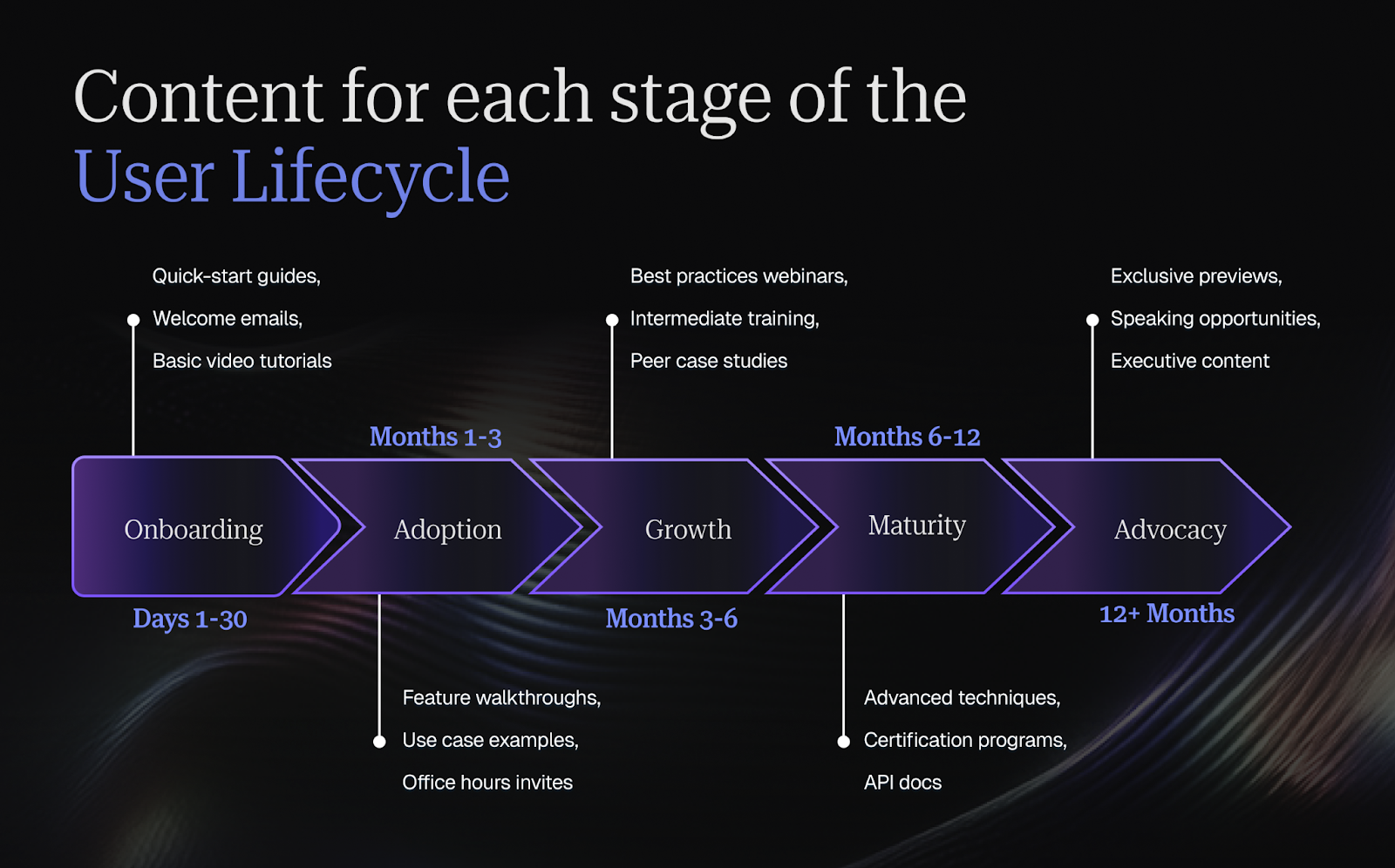
Map content types to the customer journey
Different lifecycle stages require different content. New users need getting-started guides, onboarding checklists, and quick-win tutorials. Growing users want best practices, use case examples, and intermediate training. Power users seek advanced techniques, API documentation, and early access to new features. Create content mapped to each stage.
Content format matters as much as content topic. Some users want video tutorials; others prefer written guides. Some need step-by-step instructions; others want conceptual overviews. Offer the same information in multiple formats to serve different learning preferences and use contexts.
The customer journey isn't linear. Users might loop back to earlier content as they onboard new team members. They might jump ahead to advanced content if they're experienced with similar products. Design your content library so users can navigate based on their current needs rather than forcing a rigid sequence.
Personalize content delivery at scale
Content personalization means showing users the resources most relevant to their role, industry, use case, and current engagement level. Someone in healthcare sees healthcare-specific case studies. Someone who hasn't adopted reporting features receives reporting tutorials. This relevance makes users more likely to engage with content.
Personalization technology ranges from simple (segmented email lists) to sophisticated (AI-powered content recommendations). Start simple by creating role-based resource sections, segmenting your email lists, and customizing homepage content by user type. Add complexity as you prove value from basic personalization.
Balance educational vs promotional content
Educational content helps users succeed with your product. Promotional content drives specific actions like feature adoption, upgrades, or event registration. Too much promotion and users tune out. Too little and you miss opportunities to guide users toward value. The right balance depends on your audience and context.
A common guideline is 80% educational, 20% promotional. Most content should genuinely help users without asking for anything in return. But within that educational content, you can naturally mention relevant features or capabilities as part of showing users how to solve problems.
Remember that context matters. Email newsletters should skew heavily educational. In-app messages can be more promotional because they're contextual and timely. Event invitations are inherently promotional but deliver educational value through the event itself. Match content type to channel and user expectations.
Measure content effectiveness and iterate
Track both consumption metrics (views, opens, downloads) and outcome metrics (feature adoption, behavior change, retention). A highly viewed piece that doesn't change behavior isn't truly effective. A rarely viewed resource that drives significant adoption for those who find it might deserve more promotion.
Survey users about content helpfulness. After someone uses a resource, ask if it solved their problem. Run periodic content audits where you review usage data and decide what to update, what to promote more, and what to retire. Content libraries grow unwieldy without regular pruning.
Experiment with different formats, lengths, and delivery methods. Test whether users prefer 5-minute videos or detailed written guides. Try different email send times and subject lines. A/B test different CTAs in your content. Let data guide your content strategy rather than assumptions about what users want.
How to use engagement data to drive account expansion
Identify upsell and cross-sell signals from usage data
High engagement often precedes expansion opportunities. Users approaching limits (seats, storage, API calls) are candidates for plan upgrades. Users heavily using certain features might benefit from add-ons or premium capabilities. Users solving multiple use cases might need additional products from your portfolio.
Build expansion scoring models that identify expansion-ready accounts based on usage patterns. Combine product usage data with firmographic information and buying signals. An account that's grown from 10 to 50 active users, is heavily using your product daily, and just received Series B funding is an obvious expansion candidate.
Time expansion conversations strategically based on engagement health. Don't pitch upgrades to struggling accounts before helping them find value with what they have first. Focus expansion efforts on highly engaged accounts where you've proven ROI and have executive buy-in. Success breeds more success.
For proven tactics to convert engaged users into expansion revenue, explore our guide to unlocking revenue growth through customer expansion strategies.
Promote multi-product adoption among engaged users
Customers using multiple products from your portfolio have higher retention and lifetime value. If someone loves Product A, they're predisposed to try Product B, especially if you can show how the products work better together. Use engagement data from Product A to identify good candidates for Product B.
Position multi-product adoption as solving additional problems rather than just selling more. If a customer is engaged with your marketing automation platform, introducing your CRM makes sense because it solves the next logical problem in their workflow. Lead with value, not just features.
Create bundled offerings or integration benefits that make multi-product adoption compelling. Discounted pricing for multiple products, exclusive integrations between your products, or consolidated reporting across your platform all create incentives beyond individual product value.
Expand engagement to additional stakeholders
Single-threaded relationships are risky. If your champion leaves the company, you might lose the account. Expansion means both growing usage within existing user groups and extending into new departments or stakeholder groups. Each additional stakeholder who sees value from your product strengthens your position.
Map the stakeholder landscape within each account. Who else could benefit from your product? What use cases or features would resonate with different teams? Use engagement data from current users to identify complementary use cases, then create targeted campaigns to reach new stakeholders.
Make it easy for users to bring colleagues onboard. Collaboration features, sharing capabilities, and free trial seats for teammates all reduce friction. When satisfied users can easily invite others, you create viral growth within accounts without requiring heavy sales involvement.
Time expansion conversations strategically
Expansion conversations work best after you've delivered clear value. Wait until users are actively engaged, have achieved meaningful outcomes, and are expressing satisfaction. Premature upsell attempts when value isn't yet clear damage trust and reduce the likelihood of eventual expansion.
Align expansion timing with business cycles and budget processes. B2B companies often have annual budgeting windows when they're open to new investments. Understanding your customer's fiscal calendar helps you time expansion discussions when budget exists rather than when it's locked down.
Use engagement milestones as conversation triggers. When someone reaches a usage limit, that's a natural upgrade discussion. When someone completes a major project successfully, that's a great time to discuss how they might tackle even bigger challenges with more capabilities. Let product success create expansion momentum.
Conclusion
The most successful CS organizations treat engagement as a strategic priority, not a tactical checkbox. They invest in the tools, content, and team capabilities needed to deliver value at every customer touchpoint. They use data to identify at-risk accounts early and intervene before disengagement becomes churn. They celebrate success and create communities where customers can learn from each other.
Most importantly, they remember that engagement isn't about getting users to click more buttons or open more emails. It's about helping customers achieve their business goals through effective use of your product. When you focus on delivering genuine value rather than just driving vanity metrics, engagement becomes a natural byproduct of customer success.
If you're ready to put these strategies into practice, Velaris gives your CS team the automation, health scoring, and customer intelligence needed to drive engagement at scale without the manual overhead. With a 4.7-star rating on G2, customers praise Velaris for making sophisticated engagement automation accessible without requiring a data science team.
Book a demo to see how CS teams are using Velaris to turn engagement data into retention and growth.
Frequently Asked Questions
How long does it typically take to see results from a new engagement initiative?
Quick wins like automated re-engagement emails might show impact within 30-60 days, while strategic programs like certification courses or community building often need 6-12 months before you see meaningful retention improvements.
What should I do when engagement metrics conflict with what customers are telling us?
Trust the combination of both signals, not just one. High engagement with low satisfaction often means users are struggling and clicking around trying to solve problems. That's friction, not value. Conversely, high satisfaction with low engagement might indicate customers haven't fully explored what you offer.
Conduct user interviews, watch session recordings, and ask "what would make this product indispensable?" The disconnect usually reveals blind spots in either your measurement approach or your understanding of how customers actually work.
How do I get executive buy-in for investing more in engagement when we're under pressure to cut costs?
Frame engagement as a retention strategy, not a cost center. Calculate your current churn rate's revenue impact, then model how even a modest improvement (say, 5% better retention) translates to saved revenue.
What's the biggest mistake companies make when trying to scale engagement programs?
Over-automating too quickly without validating what actually works. Companies often build elaborate automated journeys before proving the core message or timing resonates with users. Start with manual, high-touch outreach to a small segment, refine based on response rates and feedback, then automate only what's proven effective.
How can I measure engagement for customers who prefer minimal contact?
Product usage data becomes your primary engagement signal for low-touch preferences. Focus on behavioral metrics: feature adoption breadth, workflow completion rates, integration usage, and consistency of logins. Some customers demonstrate engagement through independence and don't need hand-holding because they've mastered your product.
Consider "silent health" indicators like API activity, advanced feature usage, or adding new users without CSM involvement. Also track passive engagement: email open rates, resource downloads, and documentation views. These customers are engaged; they just don't want meetings.
When should we retire or sunset an engagement program that's not delivering results?
Give programs at least two full cycles before killing them: one to launch and gather data, a second to implement improvements. However, cut losses quickly if participation stays below 5% after optimization, if the program actively annoys users (rising unsubscribe rates), or if you can't correlate participation with desired outcomes after 6 months.

The Velaris Team
A (our) team with years of experience in Customer Success have come together to redefine CS with Velaris. One platform, limitless Success.




Velaris is an AI-native Customer Success Platform built for mid-market and enterprise B2B SaaS teams. From customer health scoring and churn prediction to onboarding automation, renewals, and expansion workflows, Velaris helps recurring revenue teams understand account health, reduce churn, and scale customer success with greater visibility and control.