We look forward to showing you Velaris, but first we'd like to know a little bit about you.


How to Build a Customer Success Dashboard
Streamline your CS strategy with a unified data dashboard.
The Velaris Team
July 6, 2026
A customer success dashboard is a data visualization tool that transforms scattered data into a strategic command center. For a CS team drowning in spreadsheets and switching between tools, a well-designed dashboard shows you exactly where to focus your energy and which customers need attention now.
This guide walks you through everything you need to know, from identifying the essential metrics in a customer success dashboard, to choosing between building your own tech stack or adopting a unified platform, and finally, to maintaining your dashboard so it evolves alongside your business.
Key Takeaways:
- A good customer success dashboard gives teams one place to see what needs attention, from at-risk accounts to expansion opportunities.
- The most useful dashboards usually cover five areas: customer health, segmentation, churn signals, customer feedback, and team performance.
- Health scores are most helpful when they combine several signals, such as product usage, support activity, engagement, and progress toward customer goals.
- Segmentation helps CS teams avoid treating every account the same. A high-value enterprise customer and a low-touch customer should not trigger the same playbook.
- Churn analysis should look beyond the final churn number. Drops in usage, weaker stakeholder engagement, and negative feedback often appear before obvious renewal risk.
- Disconnected tools make dashboards harder to trust and harder to use. A unified Customer Success platform gives teams fresher data and a clearer path from insight to action.
Key components of a highly effective customer success dashboard
For a dashboard to be highly effective, it needs to answer the most immediate questions a CS leader would have: Which customers are at risk? Where should my team focus today? Are we making progress toward our retention and expansion goals?
An effective dashboard will surface insights that drive immediate action.
Here are the core elements that make a real impact:
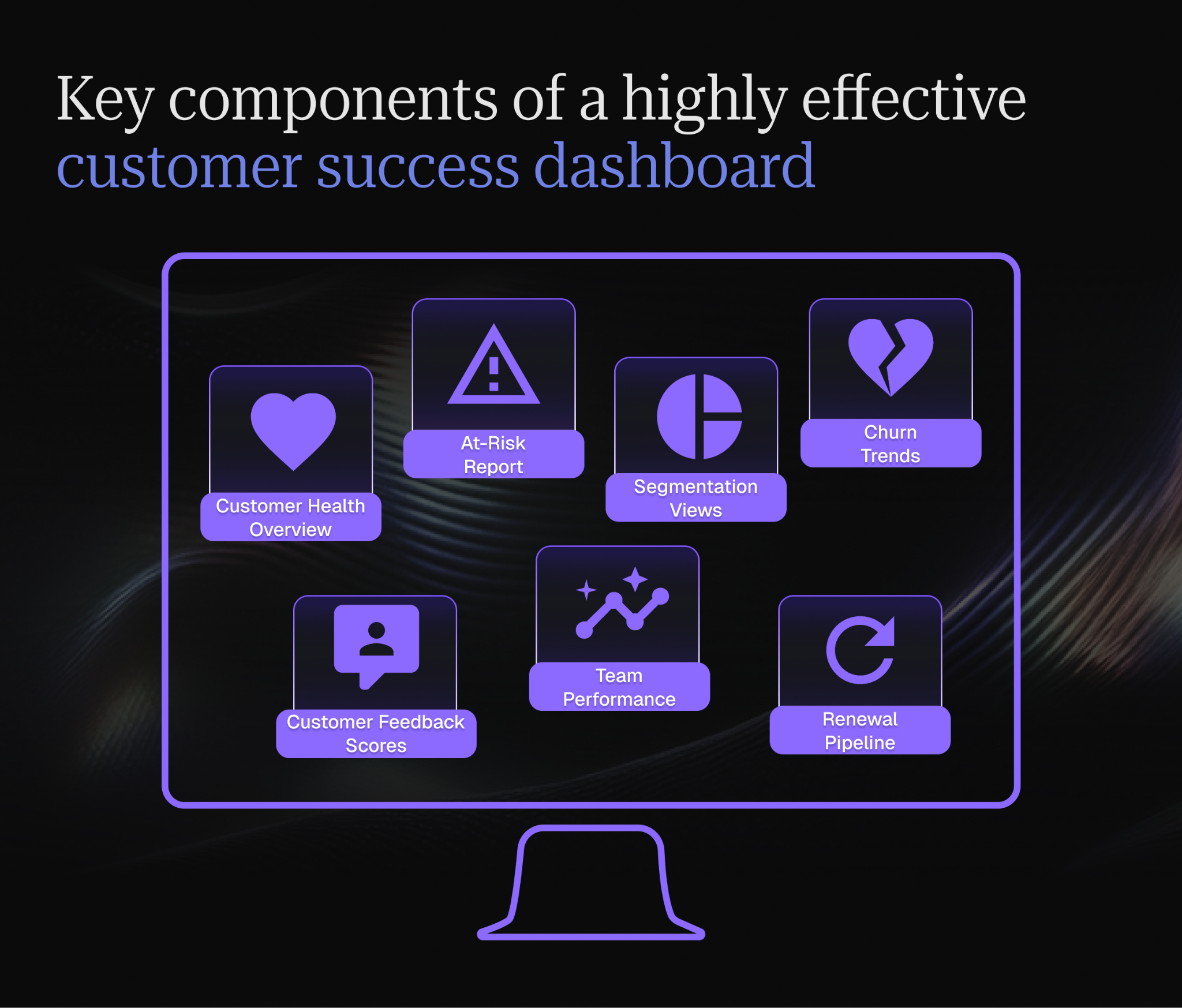
- Customer Health Overview
A color-coded health score table showing all accounts at a glance lets you spot problems instantly. Green, yellow, and red are standard indicators for different levels of customer health. Including a trend arrow (↑↓→) next to each score allows you to see movement at a glance. A customer sliding from green to yellow deserves immediate outreach even if they're not yet in the red zone.
An At-Risk Customer Report can help you filter your dashboard to show only accounts with declining engagement, upcoming renewals, or health scores below your threshold. This report becomes your daily prioritization tool.
For teams looking to design this view from the ground up, our guide to customer health dashboards covers which metrics to include and how to structure them for different team roles.
- Churn & Contraction Trends
When properly configured, health scores achieve 81-99% accuracy in predicting churn, dramatically outperforming basic metrics like contract value or support ticket count alone.
The key is weighting the right signals at the right time in the customer journey:
Track both the number of customers lost and revenue impact over time. Graphs tracking monthly churn rates alongside revenue churn tells you whether you're losing many small customers or a few large ones, which becomes critical for deciding where to invest retention efforts. Include contraction (downgrades and seat reductions) since customers who shrink often cancel entirely within 6 months.
- Segmentation Breakdown
Not all customers need the same attention, and treating them identically wastes resources while leaving some accounts underserved. A simple bar chart comparing churn rates across segments (by ARR tier, industry, or product tier) reveals patterns you'd otherwise miss.
When you notice enterprise customers renewing at 95% but SMB at 78%, you know where your retention strategy needs work. Filter any dashboard view by segment to drill into what's different about each group's experience.
- NPS and Feedback Scores
Display current NPS alongside the trend from previous quarters, broken down by customer segment. When you see your enterprise NPS at 65 but SMB at 45, you have a clear signal about where customer experience is failing.
Pair this with a list of recent detractor comments so you're not just seeing scores but understanding the "why" behind them. The stakes are higher than most teams realize: customers who experience high effort have a 96% disloyalty risk, while low-effort experiences boost loyalty by 94%. This makes CES one of the most predictive metrics for churn, often outperforming NPS and CSAT.
Your dashboard should display feedback scores alongside operational metrics so you can connect sentiment to behavior. When health scores drop and NPS declines simultaneously, you know you have a serious problem that needs immediate attention.
- CSM Activity Dashboard
Show how your team actually spends time: business reviews completed this month, accounts per CSM, average response time to customer requests. When you see one CSM managing 60 accounts with $3M ARR while another handles 25 accounts with $1.5M ARR, you can rebalance before burnout hits.
When CSMs get stuck in reactive support mode, customer retention tanks because there's no time left for the strategic work that actually prevents churn. Your dashboard should make this trade-off visible so you can rebalance toward high-impact activities. Track proactive activities (strategic business reviews, success planning) versus reactive work (support tickets) to ensure your team has time for the work that actually prevents churn.
- Renewal Pipeline
This can be a simple table showing upcoming renewals in the next 90 days, sorted by risk level and ARR. Color-code by health score and flag any accounts where the CSM hasn't logged activity in 30+ days. This prevents renewals from sneaking up on you and ensures high-value accounts get appropriate attention before their renewal date.
For teams that want to go further, renewal management software can automate much of this tracking and flag at-risk accounts without relying on manual review.
Health score methodology and calibration for customer success dashboards
Inputs need to reflect the way customers actually succeed with your product. A score based only on logins can be misleading. Some customers may log in often without using important features, while others may log in less frequently because the product is already embedded into a workflow or integration.
Choose inputs that reflect real customer value
Start by choosing signals that show whether the customer is actually getting value. Usage frequency can show whether the account is active, but feature depth shows whether they are adopting the parts of the product related to outcomes.
Support activity also matters, but a customer with many tickets may be highly engaged, while a customer with unresolved issues and negative sentiment may be at risk.
This is why health scores should combine multiple inputs: usage, feature adoption, support history, sentiment, stakeholder engagement, and progress toward agreed outcomes.
Weight signals by lifecycle stage
The same signal can mean different things depending on where the customer is in their journey. In the first month, low usage may be expected if the customer is still configuring the product or waiting on internal setup. By month 18, the same low usage could suggest disengagement.
For onboarding customers, milestone completion, training attendance, and first value may carry more weight. For mature customers, feature breadth, executive engagement, workflow depth, renewal sentiment, and business outcome progress are usually stronger indicators of health.
Validate scores against real churn and expansion outcomes
Health scores should be tested against historical customer outcomes. Look back at customers who churned, renewed, expanded, downgraded, or became advocates, then compare those outcomes against their health scores in the months before the decision.
If churned customers were consistently marked as healthy, the score is probably overweighting the wrong signals. If healthy customers are constantly flagged as risky, the model may be too sensitive or poorly matched to the customer segment.
Recalibrate the score regularly
As your product, customer base, and onboarding process change, so should your health scores. A quarterly review is usually a good starting point, but teams should also recalibrate after major product releases, pricing changes, ICP shifts, or changes to the customer journey.
A good health score should help a CSM answer three questions quickly: is this customer getting value, are they likely to continue, and what needs attention next?
Connecting dashboard triggers to playbooks
A customer success dashboard should help the team decide what to do next, in addition to showing what’s happening with customers.
The best way to make a dashboard actionable is to connect specific events to defined playbooks. For example, if an account’s health score drops below 60, that should trigger a clear next step, such as reviewing recent usage and checking support history. It can also schedule a risk call with the customer.
Map dashboard events to specific playbooks
Identify the dashboard signals that require action. These might include a health score drop, no CSM activity in the last 30 days, a sudden decline in product usage, unresolved high-priority support tickets, or an NPS score falling from Promoter to Passive or Detractor.
Each signal should have a matching playbook. A health score drop might trigger an account review playbook. No CSM activity for 30 days might trigger a re-engagement playbook. A two-segment NPS drop might trigger a feedback recovery playbook, where the CSM reviews the customer’s comments, follows up directly, and documents the root cause.
Use manual and automated triggers
A combination of manual and automated triggers should be used, based on necessity. For example, if a customer has not logged in for 14 days or if their renewal date is within 90 days and their health score is low, the dashboard can automatically notify the CSM.
Other triggers should stay manual because they require judgment. A negative comment in a QBR, a champion leaving the account, or a stakeholder asking about pricing may not fit neatly into a fixed rule. In these cases, the dashboard should make the signal visible, while the CSM decides which playbook fits the situation.
Example trigger and playbook pairings
A health score below 60 could trigger a churn risk review. The CSM would check usage trends, support issues, sentiment, and renewal timing before deciding whether to escalate the account.
No CSM activity in 30 days could trigger a re-engagement playbook. This might include reviewing the account plan, sending a personalized check-in, and booking a meeting to revisit goals.
An NPS score dropping by two segments could trigger a feedback recovery playbook. The CSM should review the customer’s written response and follow up within a defined timeframe. The reason should also be tagged so that the pattern can be tracked across accounts.
A drop in active users could trigger an adoption recovery playbook. This may involve identifying which users stopped engaging, sharing relevant training, and reconnecting the product to the customer’s original use case.
Document playbooks so new CSMs can act faster
Playbooks should be documented in a way that makes them easy to use. Each one should explain the trigger, the account criteria, the owner, the first action, the follow-up timeline, and when to escalate.
This is especially useful for new CSMs. Instead of having to learn through guessing, they can look at a dashboard signal and know what action is expected.
In Velaris, connecting dashboard triggers to playbooks is easy. A drop in health score, a change in sentiment, or many other signals can be used to trigger playbooks, helping CSMs to act fast.
Tools you need to build a Customer Success Dashboard
Building a dashboard typically requires stitching together multiple tools, each solving one piece of the puzzle. Understanding what each tool contributes and where the gaps are helps you make informed decisions about your tech stack.
Customer Relationship Management (CRM) Software
Your CRM holds customer records, contract details, renewal dates, and relationship history. It's the foundation of your customer data ecosystem: the system of record that tracks who your customers are, how much they pay, and when they're up for renewal.
But on its own, it's just a database. Salesforce, HubSpot, or Microsoft Dynamics can store vast amounts of customer information, yet they're not designed to surface the specific insights CS teams need for daily decision-making.
You'll need additional tools to turn that raw data into actionable dashboards that CSMs can actually use to prioritize their work and track progress.
Most modern CRMs offer some basic reporting and dashboard capabilities, but they're typically built for sales workflows rather than post-sale customer success. You can see renewal dates and contract values, but calculating nuanced health scores or tracking product adoption patterns requires pulling data from other systems.
Data visualization tools
Platforms like Tableau, Power BI, or Google Data Studio transform raw numbers into charts and graphs humans can understand quickly. They excel at taking data from multiple sources and creating visual representations like trend lines, heat maps, funnel charts that make patterns immediately obvious.
They're powerful, but they require technical expertise to set up and maintain. Building a dashboard in Tableau means understanding data modeling, creating calculated fields, and designing visual layouts that communicate effectively.
Expect to involve your data team or dedicate CS resources to dashboard creation and ongoing maintenance.
These tools also require you to manage the data pipeline, like getting customer data from your CRM and product analytics from your tracking tool. You’lll have to gather support tickets from your helpdesk into a unified Tableau dashboard.
This all means building and maintaining integrations, often through data warehouses or ETL tools. When those connections break, your dashboard goes stale until someone fixes it.
Survey and feedback tools
Tools like SurveyMonkey, Typeform, or Qualtrics collect customer sentiment through NPS, CSAT, and custom surveys. They make it easy to design professional surveys, distribute them through email or in-app prompts, and collect responses with good participation rates.
The challenge is getting this feedback data into your dashboard alongside operational metrics. Survey tools typically sit in their own ecosystem with their own reporting interfaces.
Combining NPS trends with churn rates or health scores often requires manual exports or complex integrations, either copying data into spreadsheets or building API connections to pull survey results into your visualization tool. This results in CS leaders having to waste effort checking multiple systems.
Analytics tools
Google Analytics, Mixpanel, or Amplitude track how customers interact with your product. These tools answer critical questions about feature adoption, user engagement, and usage patterns. They tell you which features customers use most, where they get stuck in workflows, and how engagement changes over time.
For product-led companies, this data is essential to understanding customer health. A customer who logs in daily and uses core features extensively is probably healthy. One whose usage has declined sharply might be at risk.
But like survey tools, product analytics platforms live in their own world. Connecting Mixpanel data to your CS dashboard usually means exporting reports, building custom integrations, or having your data team create ETL pipelines that move usage data into your data warehouse, then into your visualization tool.
Collaboration and project management tools
Asana, Trello, or Jira help manage CS tasks and projects. They keep teams organized around onboarding projects, renewal preparation, or strategic initiatives. CSMs can track what needs to happen for each account and ensure nothing falls through the cracks.
They're essential for workflow management but don't naturally connect to customer data. When a CSM is planning a business review in Asana, they still need to jump to their CRM to check contract details, to their analytics tool to review product usage, and to their survey tool to see recent NPS feedback. The context lives scattered across tools instead of assembled in one place.
For a deeper dive into making these decisions, check out our guide on building a winning Customer Success tech stack.
Customer success platforms
Though powerful, having all of the above tools presents a new problem: they’re separate platforms with their own unique dashboards, metrics and learning curves.
With such a set up, getting a unified view of your customers requires constant manual effort. CSMs jump between CRM for account details, analytics tools for product usage, support systems for ticket history, and spreadsheets for health scores, attempting to piece together fragments into a complete picture.
This fragmentation has real costs. Context switching costs workers an average of 23 minutes per recovery, with CSMs jumping between tools 10+ times daily. Managing five or six separate tools creates significant friction for CS teams, with each switch breaking concentration and adding minutes that compound into hours of lost productivity each week.
More critically, insights get missed when data is stuck in silos. A usage drop might sit in your analytics tool while the CSM reviews outdated information in the CRM.
This is where Customer Success Platforms come in.
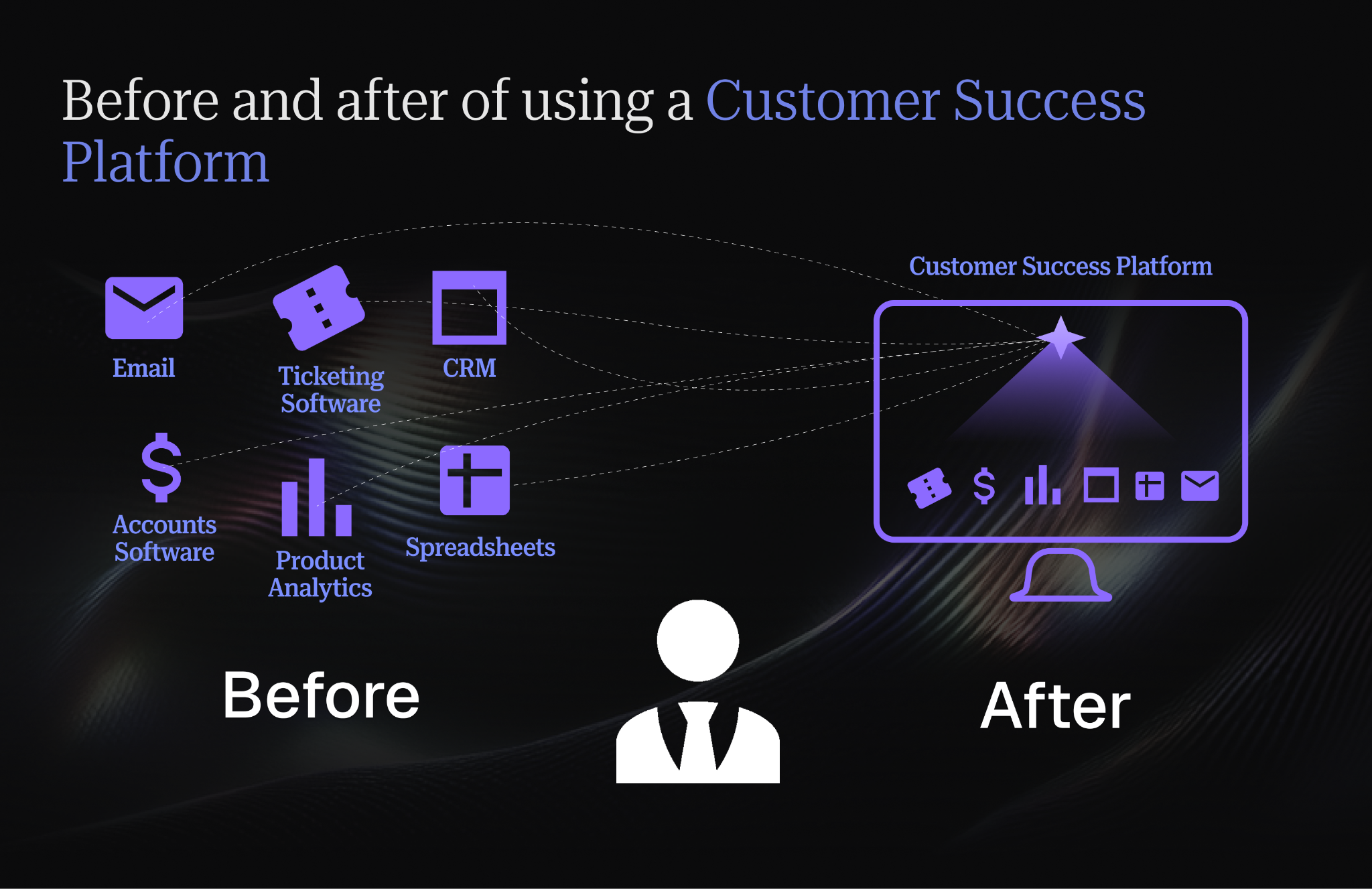
Customer success platforms consolidate all these capabilities into one unified workspace designed specifically for CS teams. CSMs work faster because everything they need is in one place.
Teams save money by replacing multiple tools with one platform. And new hires get productive faster because there's one system to learn instead of six.
Generally, a customer success platform offers less flexibility than building your own custom stack. And while this can be great for most CS teams, being able to choose your own tech stack based on budget and technical requirements is a benefit no CSM can overlook.
Velaris is a highly rated customer success platform on G2, that gives you the best of both worlds. You get a unified workspace that integrates your data in one place.
Collaborating with dashboards across teams
A customer success dashboard rarely serves only the CS team. Sales may want expansion pipeline and upsell signals. Finance may care more about ARR and renewal forecasts. Product might ask for feature adoption trends. Leadership demands a simple view of churn risk across the customer base.
Each team can pull the dashboard in a different direction. Every stakeholder request can’t be added without review, or the dashboard will quickly become crowded with metrics that serve different purposes and use different definitions, making it too messy to understand.
Start with the decision each metric supports
Before adding a metric, ask what decision it helps someone make. A renewal forecast helps Finance plan revenue. A health score helps CS prioritize risk. Feature adoption helps Product understand usage depth.
If a metric does not support a clear decision, it may belong in a separate report rather than the main CS dashboard.
CS teams also need permission to say no to metric requests that add noise, even if another team demands it. If there is no clear owner or action the metric is linked to, it should not be added to the main dashboard.
Align definitions before the dashboard goes live
Definitions also need to be agreed upfront. “At-risk account” might mean low health score to CS, delayed renewal to Finance, and low product usage to Product. If those definitions are not aligned, teams can end up arguing over the dashboard instead of acting on the customer signal.
Create dashboard layers for different teams
A practical approach is to create different dashboard layers. The core CS dashboard should focus on the metrics CSMs use every week, such as health, lifecycle stage, product usage, renewal risk, customer feedback, and next actions.
Leadership or cross-functional views can then pull from the same data, but present it differently for forecasting, product planning, or expansion discussions.
How to connect data to your customer success dashboard
Getting clean, real-time data into your dashboard is where most projects get stuck. You can design the perfect dashboard layout and choose the right metrics, but if your data connections are unreliable or your data quality is poor, the dashboard becomes useless. Here's how to do it right:
How to integrate multiple data sources to your customer success dashboard
Your dashboard needs to pull from multiple systems to create a complete picture of customer health. At minimum, you're connecting your CRM (customer records, contract details, renewal dates) and support tools (ticket volume, resolution times, customer issues).
You may also potentially need to integrate marketing platforms (campaign engagement, lead source attribution, product update communications).
Modern integration tools and APIs make this technically possible, but each connection requires thoughtful configuration and ongoing maintenance. Start by mapping out which systems hold which data. Create a data dictionary that documents where each metric originates and how it's calculated.
Then prioritize integrations based on which metrics matter most to your CS strategy. If customer health scoring is your top priority, connect product usage data first. If renewal risk is the burning issue, focus on getting contract and engagement data flowing reliably.
Consider whether you'll use point-to-point integrations (directly connecting each tool to your dashboard) or a data warehouse approach (centralizing data in something like Snowflake or BigQuery, then connecting your dashboard to the warehouse).
There’s also the option of using a customer success platform that handles integrations for you. Each approach has different trade-offs in terms of setup complexity, maintenance burden, and flexibility.
How to ensure data quality and consistency
“Garbage in, garbage out” as the saying goes. Gartner estimates poor data quality costs organizations an average of $12.9 million per year.
Before connecting data sources, invest time in cleaning up data quality issues that will undermine trust in your dashboard.
Clean up duplicates like merged companies, multiple records for the same customer, or redundant contact entries. Standardize naming conventions so "Acme Corp," "ACME Corporation," and "Acme Inc." all map to the same customer record. Establish data governance rules that prevent future inconsistencies from creeping back in.
Define what counts as an "active" customer. Is it anyone with a current contract, or do they need to have logged in within the last 30 days? How do you calculate health score? Which factors get included and how are they weighted? What's the threshold between a "healthy" and "at-risk" customer?
Getting stakeholders to agree on these definitions prevents confusion later when someone questions why dashboard numbers don't match their intuition. Document your definitions clearly and make them accessible so new team members understand what they're looking at.
Regular data audits catch issues before they undermine decision-making. Schedule monthly checks where you spot-check key metrics against source systems, verify that calculated fields are working correctly, and investigate anomalies.
When you find problems, trace them back to the root cause (which is often a change in how a source system records data or a broken integration that's failing silently).
How to automate data flows for realtime insights
Manual data exports create outdated dashboards that nobody trusts. If your dashboard shows data from last week, CSMs will ignore it and fall back to their own spreadsheets or gut instincts.
Set up automated syncs that refresh data hourly or daily depending on how quickly you need to respond to changes. Real-time dashboards let you spot at-risk customers before renewal dates slip by and recognize expansion opportunities when customer usage is trending upward.
But automation requires reliable infrastructure and error handling. Implement monitoring that alerts you when syncs fail so broken connections don't go unnoticed for days. Build retry logic so temporary failures (like API rate limits or network issues) don't permanently break your data flow.
Create validation checks that flag when data looks suspicious, like sudden drops to zero that probably indicate a pipeline problem rather than real customer behavior.
Best practices for maintaining and improving your dashboard over time
A customer success dashboard should not stay fixed forever. As your product, customer base, and business goals change, the dashboard needs to change with them.
The goal is not to keep adding more metrics over time. It is to keep the dashboard useful, trusted, and tied to the decisions your team actually needs to make.
Create a weekly dashboard hygiene rhythm
Dashboard hygiene works best when it becomes a routine, not an occasional cleanup project. Each role should have a clear rhythm for what they review and what decisions they are expected to make.
A CSM’s daily check should be short. In five minutes, they should be able to review new health score drops, accounts with no recent activity, upcoming renewals, unresolved risks, and urgent customer signals. The goal is to decide what needs attention today.
A CS manager’s weekly review should focus on patterns across the team. In 15 minutes, they can check whether risk is concentrated in certain segments, whether CSM activity is keeping pace with portfolio needs, and whether playbooks are being triggered consistently.
A VP or CS leader can review the dashboard monthly, with a focus on bigger movements such as churn risk by segment, renewal forecast changes, expansion pipeline, health score distribution, and team capacity.
Then, once a quarter, review the dashboard itself. Remove metrics no one acts on, check whether health scores still match real outcomes, and update definitions that have become unclear.
Review metrics against current business goals
Business priorities shift as companies grow. The dashboard that made sense six months ago may not reflect what the CS team needs to focus on today.
If the company is focused on expansion revenue, the dashboard should surface upsell opportunities, product adoption signals, and CSM activity around growth conversations. If the priority is improving retention in a specific segment, the dashboard should make churn risk, engagement, and health scores easy to filter for that cohort.
These reviews also help separate executive reporting from CSM workflow. Executives may need financial trends and aggregate risk views, while CSMs need account-level detail and action triggers. Instead of forcing every team to use the same view, build dashboard layers for different audiences.
Keep the data trusted
A dashboard loses value quickly when the data becomes unreliable. API connections break, CRM fields change, integrations fail, and definitions drift over time.
Run regular checks on the metrics your team depends on most, such as ARR, churn rate, renewal date, health score, and product usage. If the numbers do not match the source systems, trace the issue before teams lose trust in the dashboard.
Unusual movements should also be investigated. A sudden spike in churn could be real, but it could also come from a reporting error. A dramatic improvement in health scores might mean customers are healthier, or it might mean one of the inputs stopped feeding into the calculation.
Build simple safeguards into the process: automated alerts when data syncs fail, validation checks for impossible values, and monthly spot-checks against source systems.
Retire metrics no one acts on
Dashboard clutter makes decision-making harder. When too many metrics compete for attention, CSMs stop knowing which numbers matter most.
A good rule is to ask: does this metric change what someone does next? If the answer is no, it probably does not belong on the main dashboard.
Some metrics become less useful because the business has evolved. Early-stage teams may focus heavily on activation and setup completion, while mature teams may care more about feature depth, workflow adoption, renewal risk, and expansion potential.
The dashboard should reflect current priorities, not every metric the team has ever tracked.
Add new metrics as the customer journey changes
As your product matures, your metrics should mature too.
An early product may need to track whether customers are logging in, completing onboarding, and using core features. A more mature product may need to track advanced feature adoption, multi-team usage, integration depth, and expansion readiness.
New product lines, pricing models, or market shifts may also require new metrics. If your company moves toward usage-based pricing, consumption trends become more important. If you launch a second product, cross-product adoption may become a meaningful health or expansion signal.
The key is to add metrics because they reflect a real change in the business, not because they are interesting to look at.
Watch out for metrics that create false confidence
Some dashboard metrics can stay green even when the customer relationship is weakening. This is especially common in annual contracts, where the decision not to renew may happen months before the renewal date.
Usage may still look stable because the customer is finishing existing work, but the relationship may already be cooling. Signs such as champion turnover, fewer stakeholders joining meetings, slower email responses, weaker QBR engagement, and vague comments about priorities can all point to sentiment decay.
This is why the dashboard should combine usage data with engagement and sentiment signals. If product usage is healthy but executive participation has dropped, the account should not be treated as fully safe.
Stay up-to-date
Customer success best practices evolve as the industry matures and new approaches emerge. What worked three years ago might be outdated today as AI-powered analytics, predictive scoring, and advanced segmentation techniques become more accessible.
Attending CS conferences like Pulse, Gain Grow Retain, or customer success Summit can let you learn how other teams are measuring success. Join peer networks and online communities where CS leaders share what's working. Follow thought leaders and researchers who publish new findings about what drives retention and expansion.
These external perspectives help you avoid blind spots. You might discover that while you're still calculating health scores manually, other companies are using machine learning to predict churn with much higher accuracy. Or you might learn about new metrics like time-to-value or feature adoption velocity that better predict customer outcomes than the metrics you've been tracking.
The rise of AI-driven customer engagement is one area where practices are evolving rapidly. What seemed cutting-edge a year ago is now table stakes. Stay curious and experimental. Test new approaches on a small scale before rolling them out broadly. Not every trend will be relevant to your business, but staying informed helps you make deliberate choices about what to adopt and what to skip.
Use the dashboard to plan CSM capacity
Most CS dashboards show what CSMs have already done, such as meetings completed, tasks closed, or accounts touched. That is useful, but it does not show whether a CSM is about to become overloaded.
A stronger dashboard should include a simple capacity view. One way to estimate workload is to combine account count, account complexity, and lifecycle stage.
For example, an enterprise account in onboarding usually requires more effort than a mature low-touch account, even if both count as one customer. An account in renewal, escalation, or expansion may also require more CSM time than its ARR alone suggests.
This helps managers spot capacity issues before they affect customer outcomes. A portfolio may look manageable by account count, but not by actual workload.
Separate AI-assisted interpretation from AI-predicted metrics
AI is becoming more common in creating and enriching customer success dashboards. Velaris’s AI in CS report found that many CS teams use AI for dashboard-adjacent work like generating health scores, predicting churn and expansion, analyzing feedback, summarizing data, and updating CRM fields.
It is important to separate two different use cases: AI-predicted metrics and AI-assisted interpretation.
AI-predicted metrics generate new scores or forecasts. For example, a dashboard might use machine learning to predict churn probability or renewal risk based on historical customer data. These metrics can be useful, but they depend heavily on data quality, model design, and regular validation.
AI-assisted interpretation works differently. Instead of creating a new metric, it helps teams understand the dashboard data they already have. For example, AI might summarize why an account’s health score dropped, highlight that usage fell after a champion left, or recommend that the CSM run an adoption recovery playbook before the next renewal conversation.
This distinction matters because the dashboard design changes depending on the use case. If AI is generating metrics, teams need transparency around inputs, confidence levels, and how the prediction was calculated. If AI is interpreting dashboard data, the dashboard needs clean context, connected account history, and clear playbook logic.
The goal is not to replace the dashboard with AI. It is to make the dashboard easier to act on.
Conclusion
Building a customer success dashboard that drives real results requires more than throwing data at a visualization tool. It demands clear thinking about which metrics matter, robust data infrastructure that keeps information flowing reliably, and ongoing refinement as your business evolves.
Customer Success Platforms like Velaris, a highly rated software on G2, offer a better path: purpose-built dashboards that unify your entire CS tech stack, automate data flows, and let your team focus on what they do best: helping customers succeed. When your tools are designed specifically for CS workflows rather than adapted from generic business intelligence platforms, your team works faster and sees insights more clearly.
If you're tired of switching between six different systems just to understand one customer account, it's time to see how CS teams are replacing their fragmented tech stacks with dashboards that actually get used every day.
Book a demo and we'll show you how Velaris can turn your scattered data into strategic insights in minutes, not months.
Frequently Asked Questions
How many metrics should a Customer Success dashboard realistically include?
A strong Customer Success dashboard prioritizes clarity over completeness. Most effective dashboards surface 10–15 core metrics at any one time, organized by theme (health, risk, growth, execution). Anything beyond that creates noise and slows decision-making. If a metric doesn’t trigger a clear action or conversation, it probably doesn’t belong on the primary dashboard.
Who should own the Customer Success dashboard internally?
Ownership should sit with Customer Success leadership, not IT or data teams. While data and RevOps teams may support integrations and reporting logic, CS leaders must define what “success” looks like, which signals matter, and how metrics tie to outcomes. When CS doesn’t own the dashboard, it often becomes technically correct but operationally irrelevant.
3. How long does it typically take to build a usable CS dashboard?
A basic dashboard can be live in 2–4 weeks, but a truly trusted, decision-driving dashboard often takes 2–3 months to mature. The time isn’t spent on visuals, it’s spent aligning definitions, cleaning data, validating metrics, and iterating based on real usage. Platforms that unify data reduce this timeline significantly compared to custom-built stacks.
Should customers ever be able to see parts of the CS dashboard?
Yes, selectively. Many mature teams share customer-facing success metrics such as adoption progress, outcomes achieved, or milestone completion during QBRs or via shared success plans. Transparency builds trust, but internal metrics like churn risk or internal health scores should remain private to avoid misinterpretation.
How do you prevent teams from “gaming” dashboard metrics?
Metric gaming happens when metrics are tied to performance without context. The solution is balance: pair activity metrics with outcome metrics, and review dashboards in coaching conversations rather than as scorecards. When dashboards are used to enable better decisions instead of punish poor numbers, behavior naturally aligns with customer outcomes.
What’s the biggest sign your CS dashboard isn’t working?
If CSMs don’t check it first thing in the morning, it’s failing. A successful dashboard becomes the team’s default starting point for prioritization. When CSMs rely on spreadsheets, inboxes, or gut instinct instead, it usually means the dashboard is either outdated, overwhelming, or disconnected from daily workflows.

The Velaris Team
A (our) team with years of experience in Customer Success have come together to redefine CS with Velaris. One platform, limitless Success.





Velaris is an AI-native Customer Success Platform built for mid-market and enterprise B2B SaaS teams. From customer health scoring and churn prediction to onboarding automation, renewals, and expansion workflows, Velaris helps recurring revenue teams understand account health, reduce churn, and scale customer success with greater visibility and control.